


Most salon owners don't think about data governance until something forces them to. A stylist quits and takes their client list. A software provider gets acquired and your export button suddenly costs extra. A client asks you to delete their info and you realize you have no idea how many places that info actually lives. Or worse — you switch platforms and discover half your appointment history didn't come with you.
None of this is a technology problem. It's a policy problem. The reason so many salons get burned is that nobody ever wrote down who owns the data, what format it has to be handed over in, how often it gets backed up, and what happens when something breaks.
This post gives you the actual building blocks: a role matrix, contract clause language you can paste into vendor agreements, a backup cadence, and a breach-response checklist. It's written so a non-technical owner or manager can pull the parts they need into contracts and SOPs without hiring a lawyer for every line. You'll still want legal eyes on the final language — but you'll walk in knowing exactly what you're asking for.
Why salon data quietly becomes ungovernable
The core issue is that salon data doesn't live in one place, and it never did. Client contact info sits in your booking platform. Payment tokens live with your processor. Consultation photos are on someone's phone. Marketing lists are in an email tool. Loyalty points might be in a fourth system. Nobody set out to scatter it — it just accumulated one integration at a time.
What you tend to find across small operations is that the person who "owns" the data is whoever set up the software — often a manager who left two years ago. The login is shared. The recovery email points to an inbox nobody checks. When you ask "who can export the full client database right now," the honest answer is frequently "I'm not sure."
That ambiguity is fine until it isn't. The failure point is almost always a transition — a staff departure, a platform switch, a legal request, or an outage. That's when the lack of a governance policy turns into real money and real risk.
Quick reality check: if you couldn't rebuild your client base from an export sitting in your own control right now, you don't own your data. Your vendor does.
The role matrix: who is allowed to touch what
Governance starts with naming people, not tools. Below is a matrix you can adapt. Keep it small — most single-location salons need three roles, not seven.
Stop losing appointments in the chaos.
Salnly helps you book, confirm & manage every appointment—efficiently.
- Centralized appointment management
- Client notifications
- Calendar & staff scheduling
No credit card required
| Role | Who typically holds it | Can do | Cannot do |
|---|---|---|---|
| Data Owner | Owner / principal | Approve exports, approve vendor changes, hold master credentials, authorize deletions | Delegate final accountability |
| Data Steward | Manager / senior front desk lead | Run scheduled backups, verify export integrity, maintain the data inventory, handle routine client data requests | Change vendors, delete records without Owner sign-off |
| Operators | Stylists, front desk staff | Enter and update client records, add notes and consent forms | Export bulk data, share logins, download full lists |
| Vendors | Software providers, marketing tools | Store and process data per contract | Sell, sublicense, or withhold your data on exit |
Two things owners usually get wrong here.
First, they collapse Owner and Steward into one person and then that person goes on vacation during an outage. Separate the roles even if one person covers both day to day — write down who steps in when they're out.
Second, they give bulk export rights to too many people. Bulk export is the single most sensitive permission you have. If five staff members can download your entire client list, you have five potential leak points and zero traceability. Restrict it to Owner and Steward, and log every use.
If you operate more than one location, this matrix connects directly to how you structure canonical client records. It's worth reading our approach to customer data consolidation for multi-location salons alongside this, because a role matrix only works if everyone agrees on which record is the "real" one.
Contract clause snippets you can actually use
This is the part owners skip and regret. Your leverage over your own data is almost entirely decided before you sign with a vendor. Once you're locked in, the export button is whatever they decide it is.
Below are plain-language clause snippets. Treat them as a starting point to hand to your attorney, not final legal text. The point is to walk into the vendor conversation already knowing what to demand.
Export format and portability
> "Provider shall, upon request and at no additional cost, provide Client with a complete export of all Client data — including client contact records, full appointment history, service notes, consent records, transaction history, and marketing consent status — in a non-proprietary, machine-readable format (CSV or JSON). Exports shall include field headers and be delivered within five (5) business days of request."
The words that matter: non-proprietary format, at no additional cost, and complete. Plenty of platforms will happily export names and phone numbers but treat appointment history and service notes as "premium." That's the data that actually took you years to build.
Minimum export guarantee
> "Provider guarantees Client the ability to self-serve a full data export no less than once per calendar month through the standard interface, without requiring a support ticket, upgraded plan, or manual intervention by Provider."
A minimum export clause protects you from the slow squeeze — where export is technically possible but so gated that nobody ever does it. If you can pull your own data monthly without asking permission, you're in a much safer position.
Data escrow / exit clause
> "Upon termination of this Agreement for any reason, Provider shall deliver a complete export of all Client data within ten (10) business days and shall retain a recoverable copy for thirty (30) days thereafter to allow for verification. Provider shall not withhold, delay, or condition delivery of Client data upon settlement of outstanding fees unless such fees are undisputed and past due by more than sixty (60) days."
The exit clause is where salons get held hostage. The nightmare scenario is a billing dispute freezing your data on the exact day you're trying to migrate. The language above separates a genuine unpaid-balance situation from a vendor using your client list as a bargaining chip.
Ownership and no-resale
> "All Client data remains the sole property of Client. Provider shall not sell, license, share, or use Client data for any purpose other than delivering the contracted service, including but not limited to training models, building aggregate datasets, or marketing to Client's customers."
Read your current agreements for this one specifically. Some "free" or low-cost tools pay for themselves by monetizing your client base. That's your relationship, not theirs.
When you eventually switch providers, these clauses are what make the move survivable. Our booking-system migration playbook walks through the parallel-run and reconciliation steps — but none of it works if your contract didn't guarantee a clean, complete export in the first place.
Backup cadence: what to back up, how often, and where
Backups are where "we have it in the cloud" gives owners false comfort. Your vendor's uptime is not your backup. If your account gets locked, a sync corrupts records, or someone accidentally deletes a batch of clients, "the cloud" doesn't help — you need a copy you control.
-
Monthly full export — Steward pulls a complete data export (using the minimum-export clause above) and saves it to owner-controlled storage. Not a staff member's personal drive. A business account the Owner can actually access.
-
Weekly incremental for high-change data — If your platform allows it, export new and changed client records and upcoming appointments weekly. Optional for smaller salons, but worth it if you're regularly bringing on new clients.
-
Quarterly verification — Open the export. Actually look at it. Confirm appointment history and service notes came through, not just names. A backup you've never opened is just a guess.
-
Annual off-platform archive — Keep one full export per year in a completely separate location — a different cloud account or an encrypted external drive. This survives even a total vendor failure.
The rule of thumb: three copies, two locations, one you can reach without your vendor's cooperation.
One thing worth flagging — the most common backup failure isn't missing files, it's a Steward who left and took the only login to backup storage with them. Backup ownership has to sit with the role, not the person. When a Steward leaves, transferring backup access is a mandatory offboarding step, same as returning keys.
If your booking tool can schedule exports directly to owner-controlled storage, enable it to remove manual backup burden.
Modern booking and management platforms increasingly automate scheduled exports and drop them straight into your storage on a cadence you set — which removes the "we forgot to run it for six months" problem entirely. If your current tool can do that, turn it on today.
Breach-response checklist
A breach doesn't have to be a hacker. In salons it's far more often a lost phone with client photos, a shared login that ended up in the wrong hands, or an email blast accidentally sent with everyone's addresses visible. Small salons need a plan they can run in an hour, not a 40-page incident framework.
Keep this printed somewhere the Steward and Owner can find it fast:
-
[ ] Contain first. Reset the affected password immediately. Revoke the compromised login or device access. Don't investigate before you've stopped the bleeding.
-
[ ] Note the time and scope. Write down when you discovered it, what data was involved, and roughly how many clients. Don't guess low — estimate honestly.
-
[ ] Notify the Owner immediately. No exceptions. The Data Owner makes the call on external notifications, not the front desk.
-
[ ] Check your notification obligations. Many regions require notifying affected clients within a set window for certain data types. This is where you make one call to your attorney — don't improvise.
-
[ ] Preserve evidence. Screenshot access logs, error messages, or the exact email that went out. Don't delete anything until you understand what happened.
-
[ ] Notify affected clients if required. Use a clear, non-defensive message: what happened, what data, what you're doing about it.
-
[ ] Document the fix. Write down what changed so it can't happen the same way twice.
The mistake owners make is treating the first breach as a one-off embarrassment to quietly clean up. The point of the checklist is to turn it into a permanent process change — a revoked shared login, a tightened export permission, a fixed email template.
Your breach response also belongs alongside your other compliance documentation. If you've already built out legal-ready salon SOPs for consent, allergy checks, and incident logs, your data breach log belongs in the same binder using the same incident format. Consistency here makes staff training considerably easier.
Owner vs. manager responsibilities
Governance falls apart when everyone assumes someone else has it covered. Splitting duties clearly is what keeps the policy alive after the initial enthusiasm fades.
The Owner is responsible for:
-
Holding master credentials and recovery access
-
Approving all vendor contracts and reviewing data clauses before signing
-
Authorizing bulk exports, deletions, and data-sharing decisions
-
Making the final call during a breach
-
Reviewing the data inventory once a year
The Manager / Steward is responsible for:
-
Running the backup cadence on schedule
-
Maintaining the data inventory (what data exists, where it lives, who can access it)
-
Handling routine client data requests (updates, corrections, deletion requests)
-
Verifying exports actually work
-
Removing access during staff offboarding
The one responsibility owners should never delegate is contract review. A manager focused on daily operations will optimize for "does the software work today." Only the owner has the incentive to ask "what happens the day we leave."
A real scenario
A two-chair salon that had grown to five stylists over four years decided to move off the booking platform they'd used since opening. They assumed the switch would be a weekend project.
The export they could self-serve included client names, phone numbers, and emails — roughly 1,900 contacts. What it didn't include was appointment history or the color formula notes their senior stylists had been logging for years. Those were locked behind a "data services" request that the vendor quoted at a few hundred dollars and a two-week turnaround, right in the middle of their busiest month.
They paid it, because rebuilding four years of color formulas from memory wasn't an option. But the real cost was the scramble — a manager spending the better part of two weeks reconciling records, a delayed migration, and a stretch where stylists were guessing at formulas and a handful of clients ended up needing corrective appointments.
Afterward they rebuilt from the front end. They added an export clause to the new vendor's contract requiring service notes in the standard export at no charge. They set up a monthly automated export into an owner-controlled drive. And they wrote a one-page role matrix so the "who can pull everything" question had an actual name next to it. The next time they need to move, it should be the weekend project they always thought it was going to be.
When strict governance is overkill — and when it's non-negotiable
A brand-new solo booth renter with 60 clients doesn't need a formal role matrix and quarterly verification cycles. At that stage, a monthly export saved somewhere safe covers most of the risk. Over-engineering governance at that size just means you'll ignore it.
It becomes non-negotiable the moment any of these apply: you employ people who enter client data, you store sensitive info like consultation photos or health and allergy notes, you're on a platform you might one day leave, or you have more than one location. If two or more of those are true and you don't have a written policy, you're carrying real risk you can't see.
One hard line that applies regardless of size — don't let a single shared login be the backbone of your data access. It's the most common setup in small salons and the fastest way to end up unable to prove who did what, unable to revoke one person's access without locking everyone out, and unable to trust your own audit trail.
Getting this live in weeks, not someday
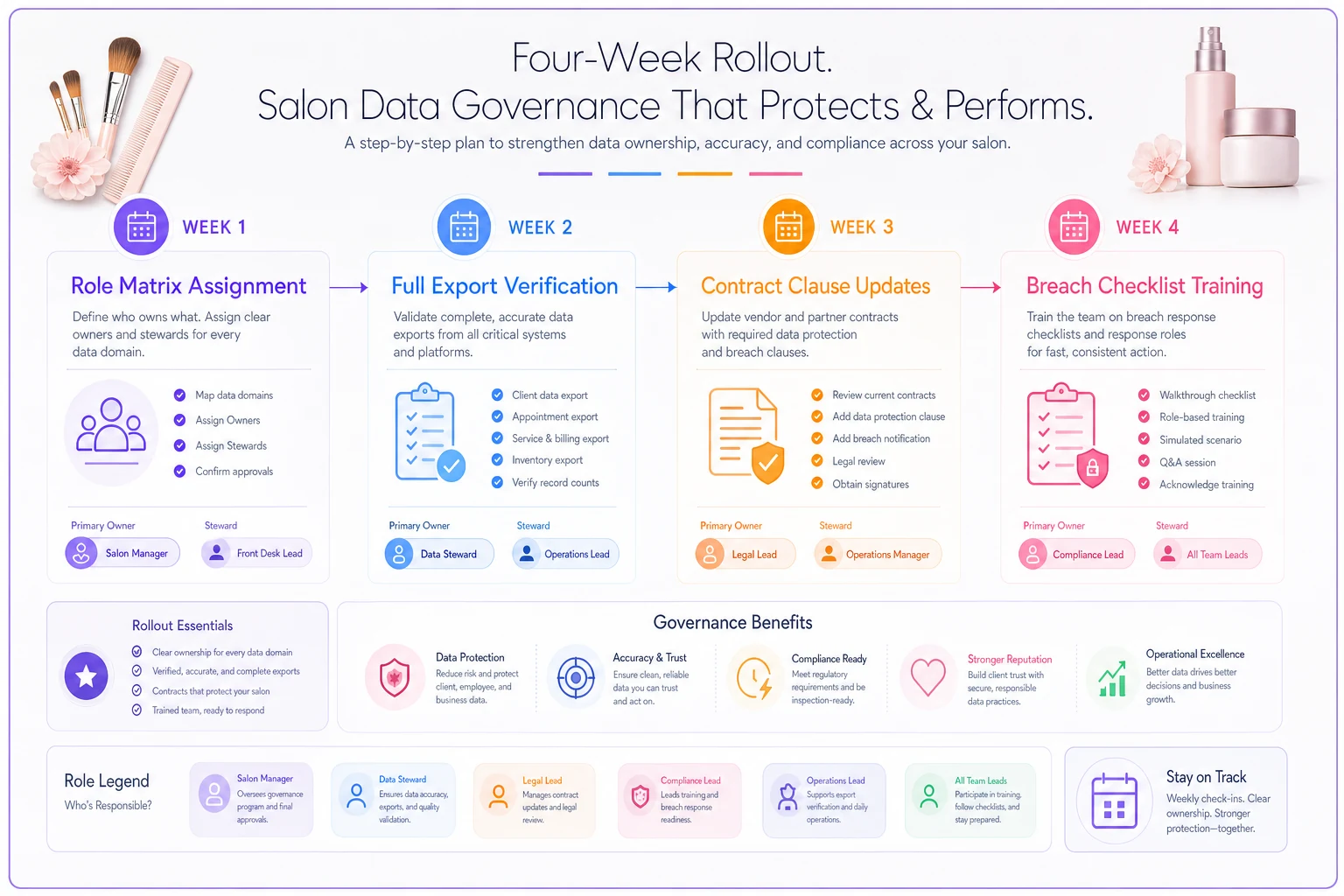
You don't need to overhaul everything at once. A workable rollout looks like this:
-
Week one — Write the role matrix and put actual names next to each role.
-
Week two — Run your first full export and confirm it actually contains everything that matters, not just contact info.
-
Week three — Add the export and escrow clauses to your standard vendor agreement so every future contract is covered.
-
Week four — Print the breach checklist and walk your team through it once.
Here's a simple rollout workflow you can follow.
Data governance stays a "someday" project because it never feels urgent until the day it becomes an emergency — and by then your leverage is gone. The salons that handle this well aren't the ones with the biggest tech budgets. They're the ones who decided, on a normal Tuesday, that their client relationships were worth owning outright. Write it down, assign the roles, pull the first export, and everything else is just maintenance.
Data governance stays a "someday" project because it never feels urgent until the day it becomes an emergency — and by then your leverage is gone. The salons that handle this well aren't the ones with the biggest tech budgets. They're the ones who decided, on a normal Tuesday, that their client relationships were worth owning outright. Write it down, assign the roles, pull the first export, and everything else is just maintenance.
Ready to simplify your salon operations?
Join 1,000+ salons using Salnly to save time, reduce scheduling chaos, and deliver better client experiences.