


Switching booking software is one of those projects that sits on the "someday" list for years — mostly because the horror stories are real. Someone's cousin's salon migrated over a weekend, lost half their future appointments, and spent three weeks calling clients to rebuild the calendar from memory. That fear keeps salons stuck on platforms that raise prices, drop features, or slow down every front-desk task.
But a bad migration isn't bad luck. It's what happens when you treat the switch like a one-day event instead of a multi-week process with actual checkpoints. The salons that move cleanly do the boring stuff: map their data before touching anything, run both systems side by side, and reconcile numbers for weeks after cutover. The ones that lose bookings skip those steps because they feel like overkill — right up until they aren't.
This is the full sequence. Not tips, not a listicle — the actual system for moving providers without your Tuesday clients quietly falling off the calendar.
Why migrations break (and it's rarely the software)
The platform you're leaving and the one you're joining almost never agree on how a salon's world should be structured. That mismatch is where things quietly fall apart.
The pattern goes like this. Your old system stores "color + cut" as a single 2-hour service. Your new system wants those as two separate service lines with their own durations and prices. When the data imports, that combined service either splits wrong, gets dropped, or lands with a default 30-minute duration — which means your calendar now thinks a full-highlight client only needs half an hour. Nobody notices until a stylist is double-booked on a Saturday.
-
Client records where phone formats differ, creating duplicate profiles
-
Recurring appointments that don't carry over due to different definitions
-
Package and membership balances imported as notes, not redeemable value
-
Gift card liabilities that vanish because unredeemed value wasn't exported
-
Deposits collected before migration that don't link to future appointments
None of these are software failures. They're mapping failures: the data existed, it just landed in the wrong field or no field at all. At scale, a small mapping gap multiplies fast: a salon with 300 active clients might shrug off five duplicates; a three-location operation with 4,000 records ends up with hundreds.
Another common false assumption: 'the data moved, so we're done.' Data movement is maybe 40% of a migration. The rest is confirming it moved correctly, that automations fire, and that money reconciles between both systems during the overlap period.
The four-phase structure that actually works
Instead of one scary cutover date, break the move into four phases. Each has an exit condition — you don't advance until the current phase passes.
Stop losing appointments in the chaos.
Salnly helps you book, confirm & manage every appointment—efficiently.
- Centralized appointment management
- Client notifications
- Calendar & staff scheduling
No credit card required
| Phase | What happens | Duration | Exit condition |
|---|---|---|---|
| 1. Sandbox dry-run | Import a copy of your data into a test environment, break things safely | 1–2 weeks | Data maps cleanly, automations fire correctly |
| 2. Parallel run | Both systems live; new bookings entered in both | 1–2 weeks | Numbers match daily; staff comfortable |
| 3. Cutover | New system becomes source of truth; old goes read-only | 1 day | Future appointments verified, payments live |
| 4. Reconciliation | Audit gaps at 30 and 60 days | 60 days | Books, deposits, gift cards all balance |
The point of phases is catching problems while they're cheap. A duration mistake found in the sandbox costs ten minutes; found after cutover it costs a double-booked Saturday and an angry client.
Phase 1: The sandbox dry-run
Before anything goes live, import a full copy of your data into a test environment on the new platform. If a vendor won't give you a sandbox, that's a yellow flag about how they handle migrations.
Your goal in the sandbox is to break things on purpose so nothing breaks in front of clients.
-
Service mapping
confirm top services have correct duration, price, and staff
-
Client dedupe
verify frequent clients appear once, not multiple times
-
Automation firing
book a test appointment and confirm reminders send
-
Financial balances
ensure gift cards and packages imported as redeemable amounts
A realistic sandbox finding: importing 1,200 clients might surface ~90 duplicates from different phone formats. Fix the mapping and standardize phone formats on import to clear most duplicates before the real move.
Data mapping template
Before you import anything, build a mapping sheet: one row per field with three columns — old field, new field, transformation rule. This forces decisions before import and becomes your single source of truth during reconciliation.
-
Old field
servicename→ New field:service+addon→ Rule: split "Color & Cut" into two lines -
Old field
phone→ New field:mobile→ Rule: strip country code, keep 10 digits -
Old field
giftcardnote→ New field:giftcardbalance→ Rule: convert text to redeemable value -
Old field
client_notes→ New field:notes→ Rule: direct copy -
Old field
deposit_paid→ New field:prepayment→ Rule: link to future appointment ID
Keep the mapping sheet handy — you'll reference it constantly during reconciliation.
Phase 2: The parallel run
Most salons skip this phase, and it's the one that saves you. For one to two weeks, run both systems simultaneously: enter new bookings into the new system while keeping the old one live as a safety net.
Yes, it's double entry. Yes, it's annoying. It's also the only way to prove the new system behaves correctly with real bookings and real clients before you depend on it entirely.
-
Do the daily appointment counts match between systems?
-
Are payments processing correctly through the new processor?
-
Are confirmations and reminders reaching clients?
-
Can your slowest front-desk person complete a booking without help?
Run a short comparison each evening: pull the day's bookings from both systems and look at differences. By day five or six they should be close to zero. When several consecutive days match and staff feel comfortable, you've hit the exit condition.
Use this phase to fix booking-flow friction rather than copying old problems into the new system; review your booking-flow audit and friction fixes as needed.
Phase 3: The cutover
Cutover should be the least dramatic day because you've already proven everything works. Pick a genuinely slow window — a Sunday night or the quietest morning. Not end of month, not before a holiday rush.
-
Final data sync from old system to new (capture bookings made since last import)
-
Verify every future appointment for the next 60 days exists in the new system
-
Confirm payment processing is live and a test transaction settles
-
Switch your online booking link/widget to the new system
-
Update your Google Business Profile and Instagram booking links
-
Set the old system to read-only (do not delete it)
-
Send the client-facing communication with the new booking link
-
Brief staff that the new system is now the only place to book
The "verify future appointments" step deserves real attention: have someone scroll the next eight weeks of calendar in both systems, day by day. A spot-check isn't enough.
Cutover day runbook (T-8h to T+48h)
| Window | Action & Operational Check | Owner (RACI) | Verification & Exit Check |
|---|---|---|---|
| T-8h (Pre-freeze) | Brief staff, freeze legacy rosters, and print paper backup schedules for the opening roster. | Front-Desk Lead (R) | Zero pending unconfirmed appointments on legacy system. |
| T-4h (Delta sync) | Lock old platform to online bookings. Export delta records and import into the new platform. | Migration Lead (A) | Schedule parity confirmed across all future appointment records. |
| T-1h (Go/No-Go gate) | Test staff access, room allocations, and live merchant processing. | Migration Lead (A) / Finance (R) | Live test charge successfully authorized and voided. |
| T-0 (Cutover launch) | Redirect website widgets, Google business booking buttons, and social links to the new platform. Set legacy tool to read-only. | Front-Desk Lead (R) | Live test appointment booked through public link displays on calendar. |
| T+2h (Morning shift open) | Validate automated client reminders and front-desk walk-in checkout flows. | Front-Desk Lead (R) | Clean client checkout with matching sales receipt and taxes. |
| T+12h (Close of day) | Perform end-of-day register reconciliation across gateway batches and appointment rosters. | Finance Owner (R) | Merchant batch settlement reconciles with daily gross intake. |
| T+24h (Post-launch review) | Review front-desk intake, recurring slot mapping, and triage support queries. | Migration Lead (A) | Triage queue cleared of unresolved scheduling mismatches. |
| T+48h (Stability sign-off) | Audit notification logs and attendance as outlined in cutover management playbooks. | Migration Lead (A) / GM (I) | Consecutive clean shifts completed without manual booking workarounds. |
Operational rollback triggers: the Migration Lead must abort cutover and revert to the read-only legacy platform if any critical failure persists during opening hours.
-
Payment gateway failure
merchant processing rejects valid cards or tokenization fails
-
Calendar integrity collapse
overlapping assignments or unresolvable double-bookings
-
Pervasive data loss
missing client records or corrupted appointment rosters preventing normal operations
Upon rollback, the Front-Desk Lead reverts booking links to the legacy provider, restores write permissions, and notifies clients of extended maintenance while preserving existing reservations.
Customer communications: what to say and when
Clients care whether their appointment still exists and whether their gift card still works. Make communications answer exactly those questions and nothing else.
-
Before cutover (about a week out)
short message saying appointments are safe and a new link is coming
-
At cutover
send the new booking link with a clear message that appointments and gift cards carried over
-
Clients with balances
send a separate message confirming transferred balance and the amount
Keep messages short and calm. Over-explaining increases the chance a client thinks something is wrong.
The 30/60-day reconciliation plan
Cutover is not the finish line. Two formal checkpoints at 30 and 60 days catch the gaps that surface with time.
At 30 days, verify these items:
-
Appointment continuity
check if recurring clients silently dropped off
-
Payment reconciliation
match system transaction totals to bank and processor statements
-
Deposit integrity
confirm pre-migration deposits are applied or linked to future appointments
-
Gift card and package balances
spot-check ten balances against read-only old system
At 60 days, verify these items:
-
Full financial close
two clean months of reconciled payments
-
Client list health
duplicates cleaned and marketing list usable
-
Automation performance
no-show rates back to normal or better
-
Old system decommission decision
export archive and shut down if reconciled
A common reconciliation win: catching gift card balances imported as notes at day 30 and correcting them before any client tries to redeem.
When a migration is worth it — and when it isn't
Migrations cost staff time and carry risk, so only proceed when the payoff is proportional.
A migration makes sense when:
-
Current platform is raising prices sharply or removing needed features
-
You're expanding to multiple locations and the system can't handle it
-
Manual workarounds are eating hours of front-desk time weekly
-
Processor fees are meaningfully higher than alternatives
A migration is a bad idea when:
-
You're in your busiest season — wait for the slow stretch
-
The only reason is a slightly nicer interface
-
You haven't confirmed the specific missing features
-
No one can own the project for a few weeks
Migration without a clear owner — one person responsible for the mapping sheet, parallel-run comparisons, and reconciliation checks — is how bookings get lost.
The workflow, start to finish
When run well, the pieces connect in sequence from mapping to decommissioning.
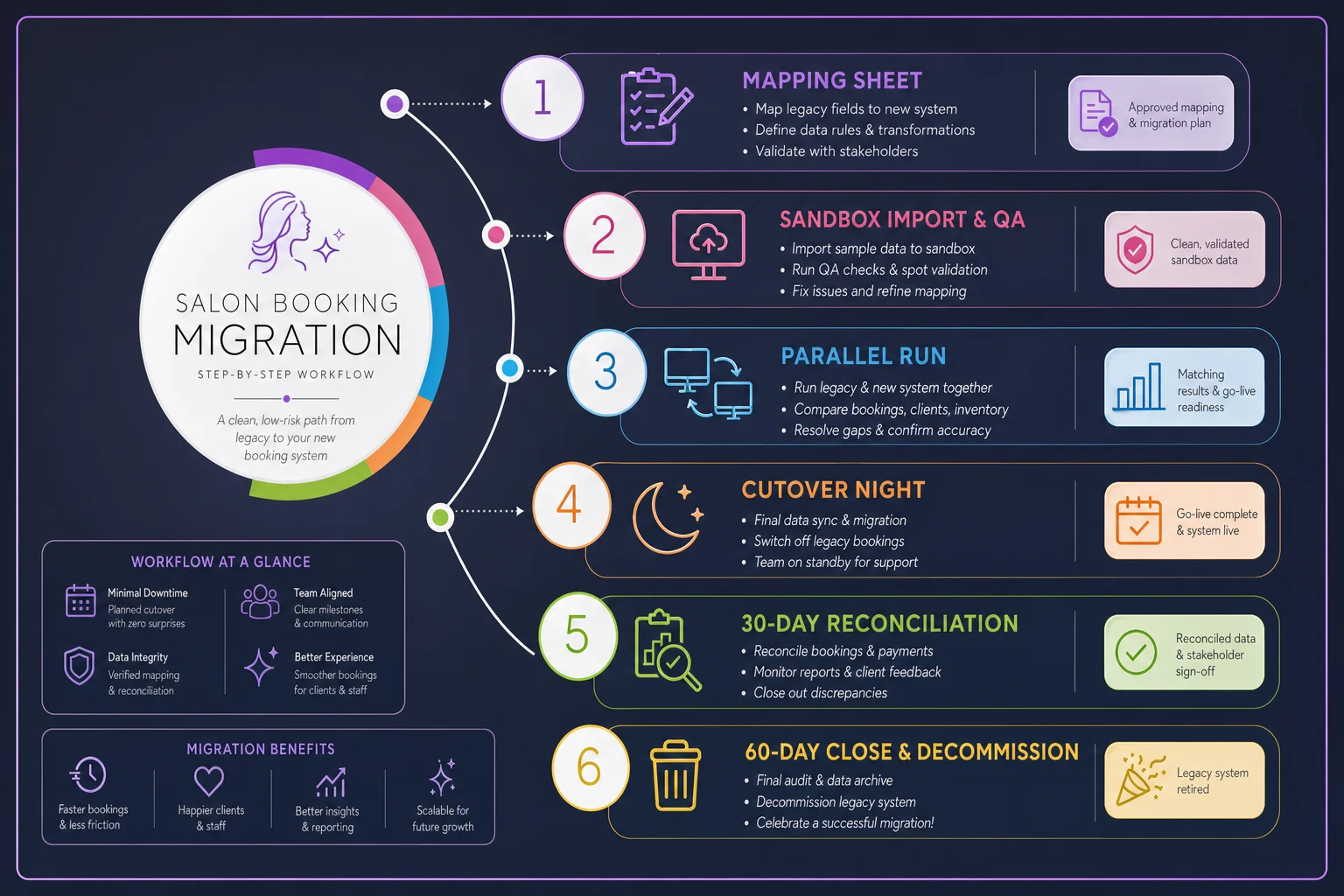
Start with the mapping sheet, break things safely in the sandbox, run both systems together, cut over on a slow night, then reconcile at 30 and 60 days. Sequence, not speed.
Final thought: a salon booking migration feels high-stakes because it is — your revenue lives in that calendar. But the risk comes from skipping steps, not from the switch itself. Map before you move, prove it in a sandbox, run both systems until numbers match, cut over when it's boring, and reconcile until the money balances.
Ready to simplify your salon operations?
Join 1,000+ salons using Salnly to save time, reduce scheduling chaos, and deliver better client experiences.