



Most salon menus grow like weeds. Someone adds a "glossing treatment," someone else adds a "bond repair add-on," a stylist starts offering extensions and wants it on the books, and two years later you've got a 40-line menu where half the services overlap and nobody — not the front desk, not the client, not even the stylist — actually knows how long anything takes.
The result is predictable. Your calendar looks full, but your revenue per chair-hour is all over the place. A senior stylist is burning 3.5 hours on a correction color priced like a 2-hour service. A junior is sitting idle because the booking system funneled a balayage to a chair that can't profitably handle it. The menu, which should be the control surface for your entire operation, is instead the thing leaking money.
This is what menu architecture actually is: not a list of services with prices, but the system that decides what gets booked, by whom, through which channel, and at what cost to your capacity. Get it right and the calendar more or less protects itself. Get it wrong and you spend every week manually untangling a schedule that was broken the moment someone hit "book."
Why menus drift into chaos (and why it's not a pricing problem)
The instinct, when margins feel thin, is to raise prices or trim the menu. Both can help. But they treat symptoms. The underlying issue is almost always that the menu has no complexity model behind it.
Think about what a single menu line actually has to encode:
-
How long the service takes (and the variance in that time)
-
What skill level it requires
-
How much backbar product it consumes
-
How predictable it is (does it blow past its slot 20% of the time?)
-
Who in the building can profitably perform it
Most menus encode exactly one of those: duration. And even duration is usually a guess copied from whatever the previous POS system had.
In real operations, this breaks down the moment two services take "90 minutes" on paper but one is a straightforward root touch-up and the other is a full-head foil that realistically runs 90–150 depending on hair density. The booking engine treats them as identical. The schedule doesn't. That gap — between what the menu promises and what the chair actually delivers — is where your utilization quietly dies.
We touched on part of this problem in the audit-driven service menu and capacity rulebook piece, but that was about auditing what exists. This is about architecting what should exist so the auditing isn't a monthly fire drill.
Complexity bands: the layer your menu is missing
The single most useful change you can make is to stop thinking in services and start thinking in complexity bands. A band groups services by how they behave operationally — not by category, not by price.
Stop losing appointments in the chaos.
Salnly helps you book, confirm & manage every appointment—efficiently.
- Centralized appointment management
- Client notifications
- Calendar & staff scheduling
No credit card required
Here's a working model that holds up across most hair-focused salons:
| Band | Characteristics | Typical time variance | Who can run it | Channel fit |
|---|---|---|---|---|
| Band 1 – Standard | Predictable, low-variance, low-skill-ceiling | ±10 min | Any stylist, including juniors | In-person, express, e-comm pre-book |
| Band 2 – Elevated | Moderate skill, some variance from hair type | ±20–30 min | Mid and senior | In-person, limited express |
| Band 3 – Complex | High skill, high variance, consultation-dependent | ±45+ min | Senior only | In-person only, consult required |
| Band 4 – Project | Corrections, transformations, multi-session | Unpredictable, often multi-visit | Senior + manager sign-off | In-person, deposit + consult gated |
Pro-tip: Band your menu by predictability, not just length.
The point isn't these exact four tiers. The point is that every service on your menu should be assigned a band, and that band should drive three downstream decisions automatically: who it can be booked with, how much calendar buffer it gets, and which channels it's allowed to appear in.
The insight most owners miss here: variance matters more than average duration. A service that averages 60 minutes but swings between 45 and 100 is far more dangerous to your schedule than one that reliably takes 75. The reliable 75-minute service you can block and forget. The swingy 60-minute one wrecks the three appointments behind it when it runs long. Band your menu by predictability, not just length.
Complexity budgets per chair-hour
Once services are banded, you can introduce the concept that actually protects capacity: a complexity budget.
Each chair, per day, has a finite amount of "complexity" it can absorb before the schedule becomes fragile. A day stacked entirely with Band 3 and Band 4 work looks lucrative on paper but is one late consultation away from collapse. A day of nothing but Band 1 is stable but underpriced for a senior stylist's time.
So you assign each band a complexity "cost" and give each chair-hour a budget.
A rough example of how this plays out for a senior stylist's 8-hour day:
-
Complexity points available per day ~24 (3 points per hour)
-
Band 1 service = 1 point
-
Band 2 service = 2 points
-
Band 3 service = 4 points
-
Band 4 service = 6 points
A day with two corrections (Band 4, 12 points) plus a full foil (Band 3, 4 points) plus two touch-ups (Band 1, 2 points) lands at 18 points — comfortably under budget, with slack to absorb overruns. Three corrections and two foils would be 26 points, over budget, and the system should either refuse that combination or flag it for manager review before it's confirmed.
This is where menu design connects directly to daily scheduling. The budget isn't an accounting exercise — it's a booking rule. It's the mechanism that stops the calendar from accepting a day it can't actually deliver. It pairs naturally with the micro-scheduling rules for stylist utilization work, because once you know a chair's remaining budget, you know exactly what kind of service you can still afford to slot in.
A realistic failure pattern
A two-location salon with eight chairs had a recurring Saturday problem: senior stylists running 30–40 minutes behind by mid-afternoon, every single week. Nobody was lazy. The menu just let the booking system stack three high-variance color services back-to-back in the morning, and the overrun compounded all day.
After banding the menu and capping Saturday morning complexity at roughly 60–70% of the theoretical max per senior chair, the lateness mostly disappeared. They weren't doing fewer services — they were doing a better mix, with cheaper, predictable Band 1 and 2 work filling the slots that used to be dangerously stacked. Revenue per Saturday held roughly flat, but the rebook conversation improved noticeably because stylists weren't apologizing for running late every week.
Tiered pricing by stylist, tied to the band
Complexity bands and stylist tiers are two halves of the same mechanism. The band tells you what skill the service demands. The stylist tier tells you what skill the person has. The pricing sits at the intersection.
The common mistake is flat per-service pricing regardless of who performs it. A balayage costs the same whether it's done by your top colorist or a second-year stylist. That feels fair on the surface, but it quietly does two bad things: it overpays the junior's time relative to their cost, and it underprices your senior's genuinely scarce capacity — which is exactly the capacity your complex work depends on.
-
Band 1 work
small or no tier premium (you want juniors doing this)
-
Band 2 work
modest senior premium
-
Band 3–4 work
meaningful senior premium, and juniors simply aren't eligible
A cleaner model prices by band × tier, where seniors carry a premium specifically on the higher bands:
This does something subtle to your booking flow. It makes Band 1 work genuinely cheaper on a junior, which nudges price-sensitive clients toward the chairs you most need to fill — and it reserves senior chairs for the work that actually justifies their rate. The juniors-and-seniors tiered pricing and rostering model goes deeper on the rostering side; the menu architecture is what makes that model enforceable at the point of booking rather than something your front desk has to remember.
When tiered pricing by stylist is a bad idea
Worth being honest about where this breaks. If your salon is three chairs and everyone is roughly equivalent in skill, tiering is just overhead — you don't have enough spread between stylists for it to mean anything. It also backfires if your junior tier is underdeveloped; sending clients to a cheaper chair only works if the quality gap is real but acceptable. Push clients into Band 1 work with juniors who aren't ready and you trade a scheduling win for a retention loss.
Tiering starts paying off when you have a genuine range of experience on the floor and enough volume that the mix of work actually matters to your P&L.
Channel mapping: in-person, express, and e-comm
The last structural layer is deciding which bands are allowed to appear in which booking channel. This is where a lot of modern salon pain lives, because online booking will happily sell anything you let it.
The problem: self-serve booking strips out the single most important control you have — the human conversation before a complex service. A client self-booking a "full color" online has no idea whether their hair history makes that a 90-minute job or a 3-hour correction. If your menu lets them book it anyway, you've handed your schedule's fate to someone who can't see the calendar.
-
In-person / phone all bands available, with Band 3–4 requiring consultation
-
Express / walk-in Band 1 only, hard-capped, no overrides
-
Online self-serve (e-comm) Band 1 and simple Band 2 fully bookable; Band 3–4 bookable only as a consultation request, never as a confirmed service slot
That last rule is the one that saves you. Band 3 and 4 work should never be a confirmed slot from a self-serve channel. It should be a request that routes to a human, who checks the chair's complexity budget and the client's history before confirming. You still capture the lead. You just don't let the lead blow up your Tuesday.
The workflow, end to end
Here's how the whole thing actually runs on a single booking:
-
Client selects a service online.
-
The service's band is looked up (already assigned during menu setup).
-
The channel rule checks whether that band is confirmable through this channel.
-
If yes, the system checks the target chair's remaining complexity budget for that day.
-
If the budget allows, it offers slots only on eligible stylist tiers.
-
If the band or budget fails, it converts the request to a consultation routed to the front desk.
-
Front desk confirms against history, deposit rules, and prep requirements.
Visual of this workflow:
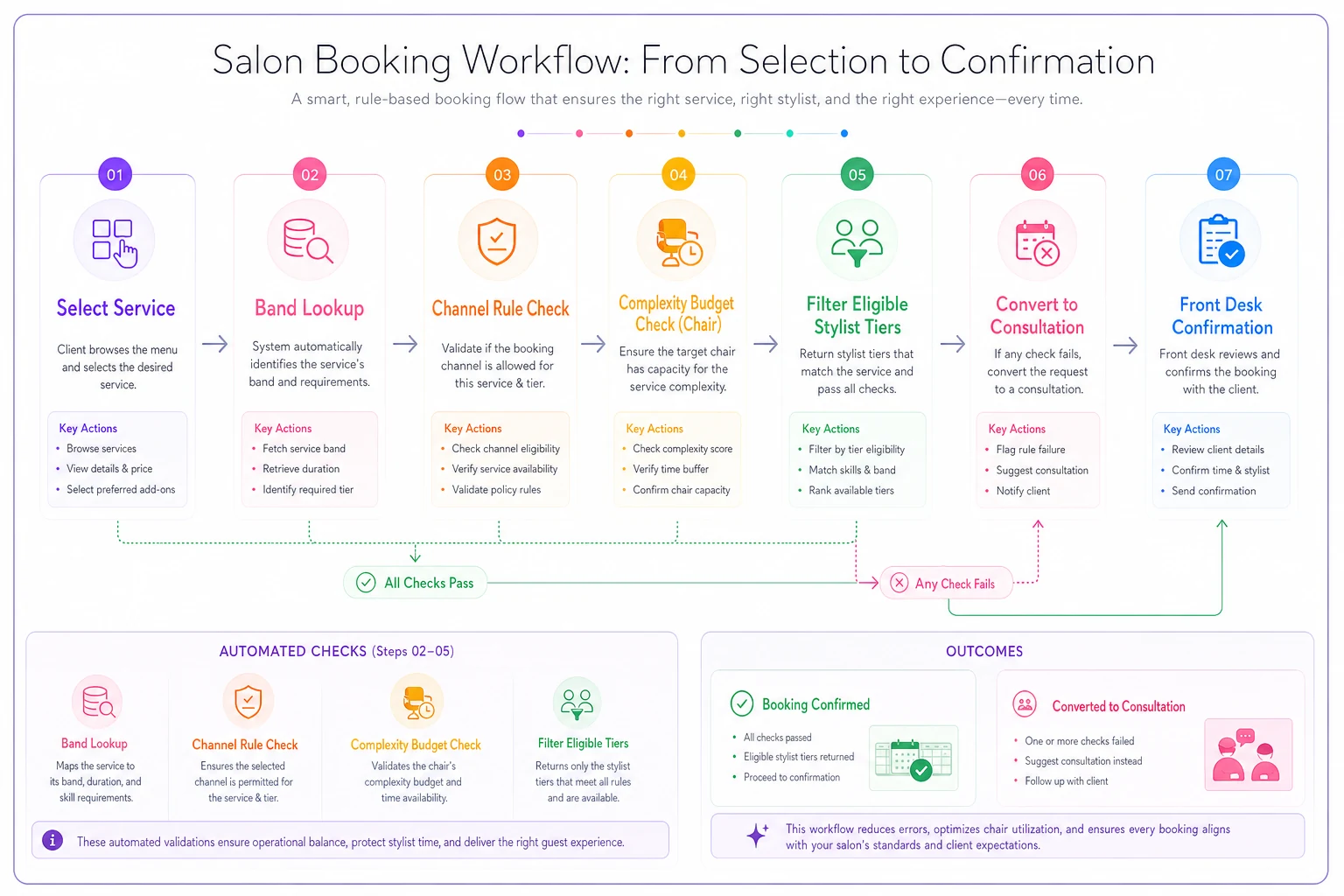
Pricing, scheduling, and capacity protection all fall out of decisions you made once, at the menu level. The front desk isn't making a dozen judgment calls per booking — the structure is making them.
Recovery rules: what happens when the budget is already blown
No system holds perfectly. Someone will override a cap. A Band 2 will turn into a Band 4 mid-appointment. A senior calls out and their Band 3 clients need rehoming. The architecture needs recovery rules, not just gating rules.
-
Overrun absorption when a service runs past its band's expected window by more than X minutes, the system flags the next appointment for the client to be proactively notified — before they're sitting in the waiting area.
-
Band downgrade on reassignment if a senior is out, their Band 3–4 clients don't get silently pushed to a junior. They get a consultation call and an honest conversation about rebooking or splitting the work across sessions.
-
Budget borrowing, capped a chair can "borrow" a small amount of complexity from the next day's budget — but only up to a hard limit, and only with a flag. This prevents the slow creep where every day quietly runs 110% and the schedule fragility compounds.
-
Express channel freeze when a day's complexity budget crosses a threshold, express/walk-in booking for that chair closes automatically. You stop adding risk to a day that's already heavy.
The mistake owners make with recovery is treating each blown appointment as a one-off apology instead of a signal. If the same Band 2 service overruns 30% of the time, it's misbanded. Recovery data should feed back into your band assignments. Services that chronically overrun get rebanded upward or split into two cleaner menu lines.
A simple checklist to pressure-test your current menu
Before redesigning anything, run your existing menu through this:
-
[ ] Can you assign every service to a complexity band in under 10 seconds? (If you hesitate, the service is probably poorly defined.)
-
[ ] Do you know the variance — not just the average — of your top 15 services' actual durations?
-
[ ] Are there services where a junior and a senior are paid the same despite very different costs?
-
[ ] Can a client self-book your most complex, highest-variance service online right now, as a confirmed slot?
-
[ ] Do you have any mechanism that stops a chair from being over-stacked with complex work on a single day?
-
[ ] When a service overruns, does anything feed that back into how it's scheduled next time?
If you answered "no" to the last three, your menu isn't protecting your capacity — it's exposing it.
When this whole system is worth building
Full menu architecture — bands, budgets, tiers, channel maps, recovery rules — is genuinely overkill for a small, single-chair-heavy salon with simple, predictable services. If your menu is twelve lines and everything runs on time, you don't need complexity budgets. Leave it alone.
It starts earning its keep when:
-
You have a real spread of service complexity (quick trims through multi-session corrections)
-
You have stylists at meaningfully different skill and cost levels
-
You're running more than one booking channel, especially self-serve online
-
Your schedule looks full but your revenue per chair-hour is inconsistent and you can't easily say why
That last symptom is the tell. A full-looking calendar with unpredictable profitability almost always means the menu is accepting work it shouldn't, through channels it shouldn't, into chairs that can't profitably deliver it.
None of this requires a reinvention of how your salon works. It's a reorganization of decisions you're already making — just moving them out of your front desk's head and into the structure of the menu itself, where they happen the same way every time. Good salon management software earns its place by enforcing these band, budget, and channel rules automatically at the moment of booking, so the architecture holds even on a chaotic Saturday when nobody has time to think.
Build the menu as a control system, not a price list, and most of the daily scheduling fights you're currently refereeing simply stop happening — because the schedule never accepted the problem in the first place.
Ready to simplify your salon operations?
Join 1,000+ salons using Salnly to save time, reduce scheduling chaos, and deliver better client experiences.