

Most salon owners adopt AI the same way they bought their first online booking tool: a flashy demo, a monthly fee, and a vague hope that it'll "save time." Then three weeks later the automated texts are confusing clients, a stylist is manually fixing double-bookings, and nobody's quite sure what data the tool has access to.
The problem isn't AI. It's the lack of a roadmap. Owners jump straight to "which tool" before answering "which problem, how do we test it safely, and what happens when it gets something wrong." This piece lays out the opposite approach — risk-first, vendor-neutral, and built around small pilots you can actually control.
Start by ranking risk, not excitement
The instinct is to automate the thing that annoys you most. Usually that's the phone ringing during a color service, or the no-show that killed your Saturday afternoon. Understandable — but "most annoying" and "safest to automate first" are rarely the same thing.
A better filter is scoring each potential automation on two axes: how much manual work it removes and how bad the damage is if it goes wrong. Automating your end-of-day sales summary is low-risk — if it's wrong, you catch it and move on. Automating client-facing messaging during a chemical service consultation is high-risk — a wrong answer about processing time or allergy history can mean a refund, a bad review, or worse.
| Candidate | Manual work removed | Risk if wrong | Pilot priority |
|---|---|---|---|
| Appointment confirmations & reminders | High | Low–Medium | First |
| Waitlist / cancellation fill messaging | High | Medium | First |
| Routine FAQ replies (hours, parking, pricing) | Medium | Low | Early |
| Rebooking nudges after a visit | Medium | Low | Early |
| Inventory reorder suggestions | Medium | Low | Early |
| Review response drafting | Low–Medium | Medium | Mid |
| Staff schedule drafting | High | Medium–High | Later |
| Service recommendations / upsell messaging | Medium | High | Later |
| Anything touching allergy/medical screening | Medium | Very High | Human-only or last |
Notice what sits at the bottom. The highest-stakes conversations — medical triage, allergy history, chemical service suitability — are exactly the ones you don't hand to automation early, no matter how good the demo looks. A tool that drafts a reminder text and occasionally phrases it awkwardly costs you nothing. A tool that tells a client a relaxer is "probably fine" when they flagged a scalp condition costs you everything.
Why adoption breaks across most salons
The failure pattern is remarkably consistent, and it almost never has to do with the technology itself being bad.
Stop losing appointments in the chaos.
Salnly helps you book, confirm & manage every appointment—efficiently.
- Centralized appointment management
- Client notifications
- Calendar & staff scheduling
No credit card required
It breaks because nobody defined "good enough." Owners turn on an automation, it works 85% of the time, and the 15% of weird edge cases — the client who books, cancels, and rebooks three times; the double-barreled last name the system mangles — generate enough front-desk cleanup that staff quietly stop trusting it. Without a defined accuracy bar, "mostly works" feels like "broken."
It breaks because the automation gets bolted onto a messy process. If your service durations aren't standardized and your calendar already has overlapping blocks, automating scheduling just automates the chaos faster. AI amplifies whatever system it sits on top of — tidy or sloppy.
It breaks because there's no owner. Someone has to watch the pilot, read the flagged cases, and decide whether it's working. When that responsibility belongs to "everyone," it becomes no one's, and the tool drifts.
And it breaks at the data layer. A lot of owners sign up without knowing where their client data now lives, whether they can export it, or what happens if they cancel. That's a governance gap worth closing before you pilot anything — the groundwork in a solid salon data governance policy makes every later AI decision cleaner, because you already know what data exists, who can touch it, and how it leaves the building.
The pilot template you can copy
Every automation you test should run inside the same lightweight structure. Keep it boring and repeatable — the point is to make go/no-go decisions on evidence, not gut feeling.
-
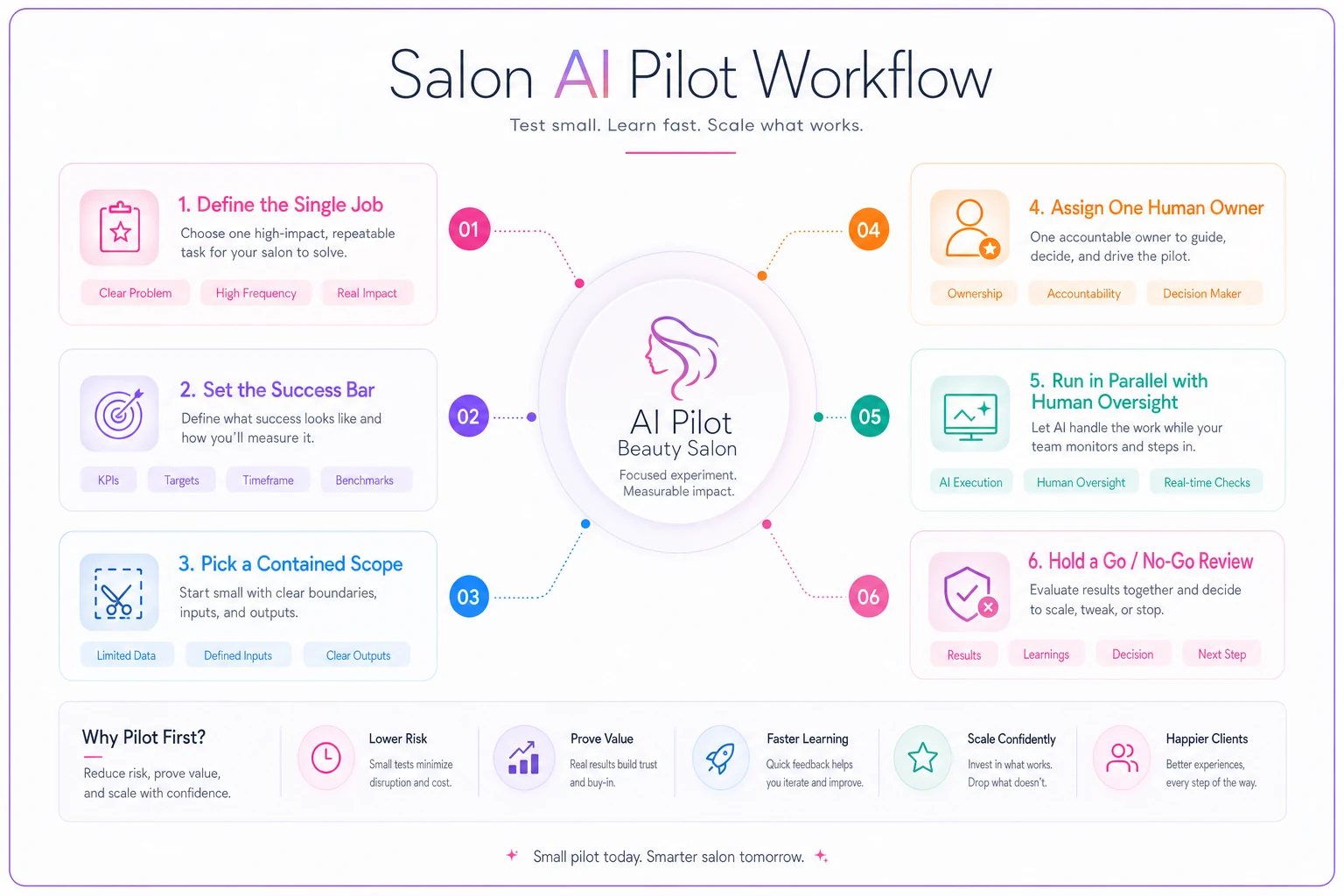
Define the single job. One sentence. "Send a reminder 24 hours before the appointment and offer a one-tap confirm." Not "improve communication." If you can't write it in one sentence, it's two pilots.
-
Set the success bar before you start. Example
"Confirmation reply rate above 60%, fewer than 2 client complaints per 100 messages, zero wrong appointment times." Numbers you agree on in advance can't be rationalized away later.
-
Pick a contained scope. One location, one stylist's column, or one service category for two to four weeks. Never your whole book at once.
-
Assign one human owner. They review flagged cases daily and keep a simple log of what went wrong and how often.
-
Run it in parallel, not replacement. For the first week or two, the automation drafts and a human still sends — or spot-checks every message. You're watching it work before you let it work alone.
-
Hold a go/no-go review. Against the bar you set in step 2. Three outcomes only: expand, adjust and re-run, or kill it.
This mirrors how disciplined owners already test booking software — a fixed window, defined checks, and a clear decision at the end. If you've run a structured 7-day software trial, this will feel familiar. Same muscle, applied to automation.
This flow visualizes the pilot steps above.
If you've run a structured 7-day software trial, this will feel familiar. Same muscle, applied to automation.
Human-in-the-loop rules that actually hold
"Human-in-the-loop" gets thrown around a lot, but in a salon it just means deciding in advance which messages a human must touch and which can go out on their own. Write these as explicit rules so a new receptionist can follow them without guessing.
A practical ruleset looks like this:
-
Auto-send, no review standard reminders, confirmation requests, "your stylist is running 10 minutes behind" alerts, routine hours/location replies.
-
Draft, human sends review responses, reactivation messages to lapsed high-value clients, any message quoting a price on a custom service.
-
Human-only, no automation allergy or medical screening, chemical service suitability, dispute or refund conversations, anything involving a minor.
-
Hard stop / escalate if a client message contains words like "allergic," "reaction," "burned," "refund," or "lawyer," the system flags it to a human immediately and sends nothing automated.
That last rule matters more than it looks. The cheapest insurance in any AI pilot is a keyword tripwire that pulls a human in before the automation says something it shouldn't.
Set a review cadence too. In the first two weeks the owner reads every flagged case. After that, if the error rate holds under your bar, you can move to spot-checking a sample. The loop never fully disappears — it just loosens as trust is earned.
Disclosure: tell clients, and keep it plain
There's a real temptation to hide the automation and let clients think they're texting a person. Don't. It backfires the moment someone asks a nuanced question and gets a robotic non-answer, and it reads as dishonest once they figure it out.
> "Replies to this number are partly automated to answer quickly. For anything detailed, just reply 'team' and a person will get back to you."
Two things that line accomplishes: it sets expectations, and it gives clients an escape hatch to a human. The salons that handle this well treat automation as a fast front door, not a wall. Clients are fine with a bot confirming their 3pm — they're not fine with one stonewalling them about a color correction.
Keep a record of what you disclosed and when, especially if you operate in a region with messaging-consent rules. Disclosure and consent are close cousins, and getting both documented early saves you a scramble later.
Data-export safeguards before you commit
This is the part owners skip and regret. Before any AI tool touches live client data, answer four questions in writing:
-
Can I export everything, in a usable format, on demand? Client records, appointment history, message logs — not a locked PDF, but a real CSV or equivalent.
-
What happens to my data if I cancel? Is it deleted, retained, or used to train the vendor's models? Get it in the contract, not the sales call.
-
Who at the vendor can see client information, and is it encrypted? "Trust us" isn't an answer.
-
Is the tool reading data it doesn't need? A reminder tool does not need your full financial history.
Run a test export in week one to verify you can get your data out cleanly.
A simple safeguard: run your pilot on a limited data scope where possible, and do a test export in week one. If you can't cleanly get your data back out during a pilot, that's your answer on whether to scale it. The last thing you want is six months of client interaction history locked inside a tool you can't leave.
Change-management gates: don't let a pilot quietly become permanent
The sneaky failure isn't a pilot that crashes — it's a pilot nobody ever formally approved that just keeps running. No review, no accountability, no one sure if it's actually helping. Gates prevent that.
-
Gate 1 — Pilot approval. Job defined, success bar set, owner assigned, data-export checked. No pilot starts without this.
-
Gate 2 — Expansion review. Hit the success bar in the contained scope? Only then do you widen it to more stylists or locations. Miss it, and you adjust or kill it.
-
Gate 3 — Operationalize. The automation gets written into your SOPs, staff are trained on the human-in-the-loop rules, and someone owns ongoing monitoring. Now it's part of the business, not an experiment.
This gating logic is the same discipline behind any good rollout. If you've used a structured approach to roll out new SOPs with adoption gates, apply the exact same gates here — the fact that it's AI changes nothing about the need for training, buy-in, and a clear owner. Tools that skip straight from demo to full deployment are the ones that quietly rot.
A real scenario: starting small and staying boring
A two-location salon running roughly 330–360 appointments a month combined was losing a frustrating number of slots to late cancellations and no-shows. The front desk was already stretched, and manually working a waitlist by phone rarely filled the gap in time.
They piloted one thing only: automated cancellation-fill messaging. When a slot opened, the system texted the three most recent waitlist clients for that service with a one-tap claim. Success bar set in advance — fill at least one in four opened slots, zero wrong-service offers, under two complaints per month. Human-in-the-loop rule: anything involving a deposit refund or a color correction routed to a person immediately.
By week four they were filling somewhere around a third of short-notice openings that previously went empty. Not dramatic, but a steady recovery of slots that used to just vanish. Just as important, the front desk started trusting it — because the scope was small and the owner had read every flagged case for the first two weeks. They only passed it through the expansion gate to the second location after that trust was established.
What made it work wasn't the sophistication of the tool. It was the smallness of the pilot, the pre-set bar, and the refusal to let it touch high-risk conversations.
When this makes sense — and when it doesn't
This approach makes sense when you have reasonably clean core processes, at least one person who can own a pilot, and a specific, repetitive task eating front-desk time. Confirmations, waitlist fills, routine FAQs — careful automation pays off here quickly and quietly.
It's a bad idea when your underlying process is already broken. If service durations are inconsistent and your calendar is a patchwork of overlapping blocks, fix that first. Automating a broken booking flow just produces broken bookings faster.
Who should probably wait: a solo operator with no one to monitor a pilot, or a salon mid-migration between booking systems. Wait until your data is stable and someone has bandwidth to watch the first few weeks. AI without a human watching the early innings is just a faster way to make the same mistakes at scale.
The roadmap, pulled together
A sane salon AI adoption roadmap isn't about chasing the best tool. It's a sequence: score candidates by risk, not excitement; pilot one job at a time inside a fixed template with a pre-set success bar; keep a human in the loop on anything that can hurt a client; disclose plainly; lock down your data exports before you commit; and gate every step so a pilot can't sneak into permanence unexamined.
Do that, and the vendor you eventually choose matters far less than how you adopt it. The owners who get burned picked a tool first and figured out the guardrails never. The ones who got real value started with the guardrails and let those decide which tools earned a place in the business. Start with one low-risk pilot, run it boring and contained, and expand only what proves itself.
Do that, and the vendor you eventually choose matters far less than how you adopt it. The owners who get burned picked a tool first and figured out the guardrails never. The ones who got real value started with the guardrails and let those decide which tools earned a place in the business. Start with one low-risk pilot, run it boring and contained, and expand only what proves itself.
Ready to simplify your salon operations?
Join 1,000+ salons using Salnly to save time, reduce scheduling chaos, and deliver better client experiences.