

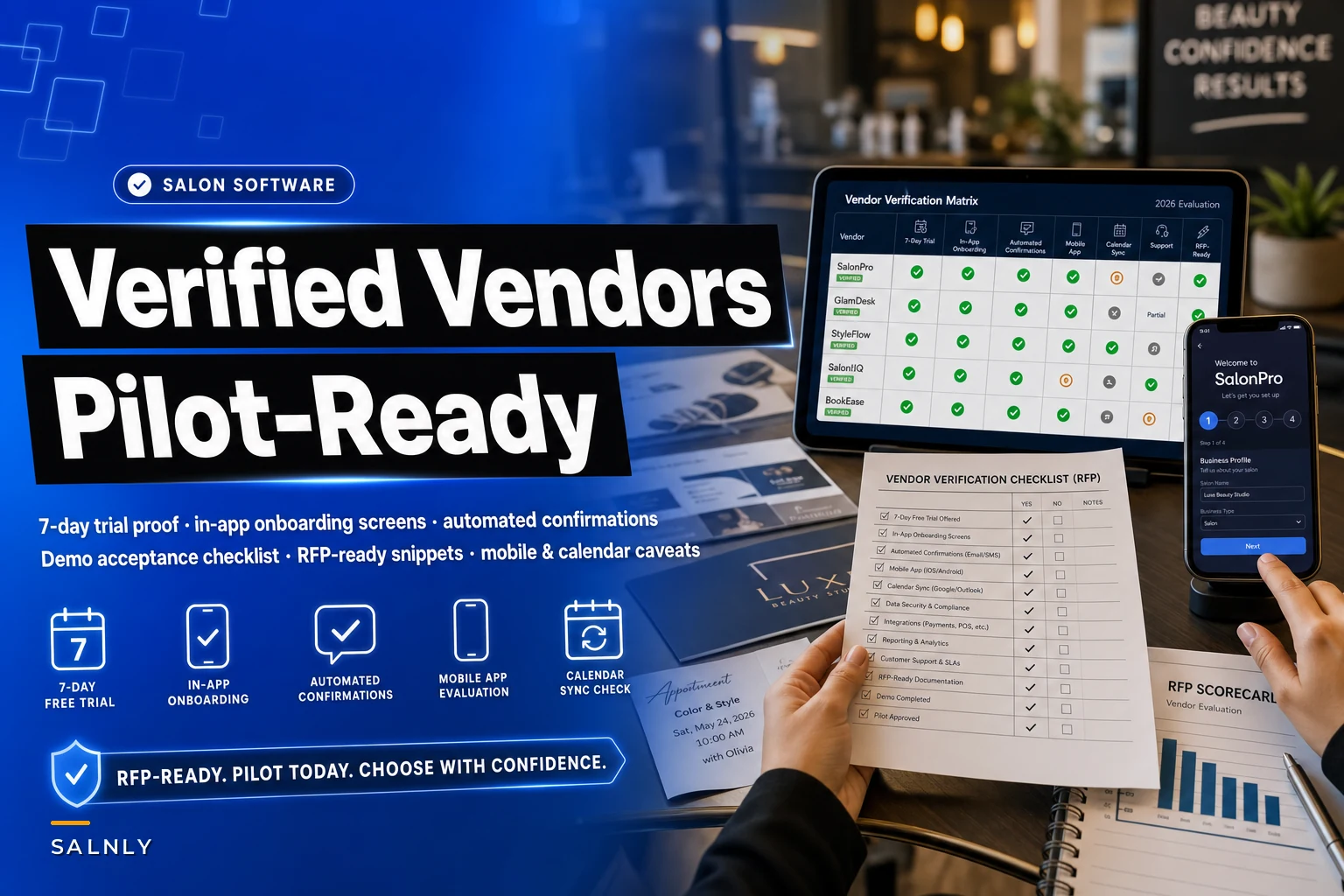

Most salon software shortlists fall apart the moment you actually test them. The demo looked great. The sales rep promised a free trial, in-app onboarding, and automated confirmations. Then you sign up and find out the "trial" requires a card and auto-converts, onboarding is a 40-minute Zoom call instead of screens you can click through yourself, and the "automated confirmations" are a paid add-on buried three tiers deep.
This piece exists to close those gaps. It's not another "how to choose software" overview. What's missing from most comparisons is a tight, verifiable filter: a matrix that only includes vendors meeting all three specific criteria, plus the evaluation methods and caveats nobody puts in their sales deck.
Everything here is framed so you can verify it yourself. No trust required.
The three criteria that actually matter (and why "yes" usually means "sort of")
Before any matrix makes sense, you need airtight definitions. Vendors exploit fuzzy language constantly.
1. A genuine 7-day free trial
-
No credit card required to start, OR a card that will not auto-charge without an explicit second confirmation
-
Full access to the features you're evaluating (not a stripped "demo mode")
-
At least 7 continuous days of usage
The trap: many vendors offer a "free trial" that's really a guided sandbox — pre-loaded fake data, no ability to send a real confirmation to your own phone, no way to connect your real calendar. If you can't run an actual appointment through it end-to-end, it doesn't count.
2. In-app onboarding screens (self-serve)
This means interactive setup guidance built into the product — checklists, tooltips, guided flows, progress indicators — that you can complete without scheduling a call.
The problem is that "onboarding" in vendor language often means a rep walks you through it. That's fine as a bonus, but it's not the same thing. The test is simple: can a new front-desk hire set up a service and book a test appointment using only what's on screen?
3. Built-in automated confirmation flows
Confirmation and reminder messages that fire automatically, configured inside the platform, included in the plan you're evaluating — not a bolt-on, not a third-party integration you have to wire up yourself.
The trap: "automated confirmations" that require connecting an external SMS provider, or that only exist on a higher tier. If it's not working during your trial on the plan you'd actually buy, treat it as absent.
The verified vendor matrix — and the citation rule
Here's the honest part most articles skip: a static "verified" matrix goes stale fast. Vendors change pricing tiers, trial terms, and feature bundling quarterly. Any table claiming permanent accuracy is misleading you.
Stop losing appointments in the chaos.
Salnly helps you book, confirm & manage every appointment—efficiently.
- Centralized appointment management
- Client notifications
- Calendar & staff scheduling
No credit card required
So instead of publishing a list of names that'll be wrong in three months, this section gives you the matrix structure plus a citation checklist so you can build and defend your own — the version that's true on the day you actually buy.
| Vendor | 7-day trial (no forced charge)? | Self-serve in-app onboarding? | Built-in auto confirmations on eval plan? | Source URL + date checked | Verified? |
|---|---|---|---|---|---|
| Vendor A | |||||
| Vendor B | |||||
| Vendor C |
Citation checklist — a row only counts as "verified" if you can attach:
-
A screenshot or URL of the pricing/trial page showing trial length and card requirement
-
The exact plan name where confirmations are included (not "starts at" pricing)
-
A dated note of when you checked (terms change; a claim without a date means nothing)
-
Confirmation you tested it live, or a direct quote from support in writing — email or chat log, not a phone call
That last point matters more than people realize. Get feature promises in writing. A sales rep saying "yes, that's included" on a call is not something you can hold anyone to later.
Taxonomy: getting the words straight
Half of vendor confusion comes down to vocabulary. Sort these out before comparing anything.
-
Confirmation — a message sent right after booking, confirming the appointment exists. One-time, immediate.
-
Reminder — a message sent before the appointment (24h, 2h, etc.). Recurring by schedule.
-
Notification — internal alerts to staff, not the client. A different system entirely.
-
Two-way messaging — the client can reply and the reply lands somewhere a human actually sees. Many "confirmations" are send-only.
-
Onboarding (self-serve) — in-product guided setup.
-
Onboarding (assisted) — a human helps. Not interchangeable.
-
Calendar sync (one-way) — appointments flow out to an external calendar but external events don't block your salon calendar.
-
Calendar sync (two-way) — external events also block availability in the salon system.
Write these at the top of your comparison sheet and hold every vendor to them. When a rep says "yes we have confirmations," your next question is: "one-time confirmation, scheduled reminders, or both — and can clients reply?"
Region filter: US vs EMEA differences that break deals late
Software that works well for a US salon can be a compliance headache in the EU, and vice versa. Filter early.
US considerations
-
SMS traffic routes through carrier systems governed by 10DLC registration (more on this below)
-
Payment processing and tipping norms baked into the product
-
TCPA rules around consent for automated messaging
EMEA considerations
-
GDPR
consent handling for storing and messaging client data must be explicit; data residency may matter
-
WhatsApp is often the dominant channel, not SMS — check whether the vendor supports the WhatsApp Business API natively
-
VAT handling in invoicing
-
Some US-first vendors don't have EU data hosting, which can be a dealbreaker for larger practices
A vendor that's great in one region may quietly not support the other's messaging channel at all. Ask directly: "Which country's phone numbers and messaging channels are supported on my plan?"
Evaluating the mobile app objectively (not by star rating)
App store ratings are close to useless for this. A 4.7 average can hide a client-facing app that's beautiful and a staff app that's broken — or a rating inflated by reviews of an old version.
-
Last update date — anything not updated in 6+ months signals a neglected app.
-
Version history depth — steady updates mean an active team. A flat changelog is a warning sign.
-
Separate staff vs client apps — check both exist and both are maintained. Plenty of vendors nail the client booking app and neglect the staff app your team actually lives in.
-
Offline behavior — open the app, kill your wifi, try to view today's schedule. A salon with spotty back-room signal needs this to work.
-
Core-task speed — time how long it takes to book, reschedule, and check a client's history. Do it yourself during the trial.
-
Review recency filter — read only reviews from the last 60 days. Old complaints may be fixed; recent ones reflect your actual future.
During your 7-day trial, run five real tasks on the staff app — book, reschedule, cancel, check client notes, process a checkout — and time each one. Anything that takes more than a few taps or feels laggy is what your front desk will fight every single shift.
Calendar sync: the directionality question that causes double-bookings
This is where a lot of buyers get burned quietly. "Calendar sync" sounds binary. It isn't.
-
Does it sync out to Google/Apple/Outlook? (Appointments appear on personal calendars.)
-
Does it sync in? (Personal calendar blocks reduce salon availability.)
-
Is it real-time or batched? A 15-minute delay can produce a double-book during busy hours.
-
Per-staff or salon-wide? Some systems sync at the account level only.
Note the directionality explicitly in your matrix. "Has calendar sync ✓" is not enough information to make a real decision.
Operational caveats: SMS, WhatsApp, and 10DLC
This is the section that gets skipped and then bites people six weeks after launch.
10DLC (US): Automated SMS from a business number now requires registering your brand and campaign with carriers. Without it, messages get filtered or blocked — which means your "automated confirmations" silently don't arrive. Ask the vendor:
-
Do they handle 10DLC registration for you, or is it on you?
-
What are the fees, and how long does approval take? (It can take days to weeks.)
-
What's the fallback if registration is pending during your first live week?
WhatsApp (EMEA and beyond): Requires Business API access and approved message templates for notifications. Confirm the vendor supports it natively, not through a fragile workaround.
Deliverability reality: Even registered SMS has failure rates. A confirmation system without a fallback — email backup, or a staff-visible "unconfirmed" flag — will let no-shows slip through.
Where automated confirmation flows genuinely earn their keep is in removing the manual "did we confirm everyone for tomorrow?" scramble at the front desk — but only if delivery is actually configured and monitored, not just assumed.
The 10-question vendor questionnaire
Send this verbatim and demand written answers. Vague replies are a signal.
-
Does the 7-day trial require a credit card, and does it auto-convert to paid? (Yes/No + details)
-
On the specific plan I'm evaluating, are automated confirmations and reminders included at no extra cost?
-
Is onboarding self-serve inside the app, human-assisted, or both?
-
Is calendar sync one-way or two-way, and is it real-time?
-
For US
do you handle 10DLC registration, and what are the fees and timeline?
-
For EMEA
do you support WhatsApp Business API natively, and where is client data hosted?
-
Can clients reply to confirmation messages, and where do replies go?
-
Are the staff mobile app and client app separate, and when was each last updated?
-
What happens to my data if I cancel during or after the trial — can I export it?
-
Is there a contract lock-in, or is it month-to-month after the trial?
Vague replies are a signal.
A 7-day pilot: demo + acceptance checklist
TRIAL PILOT FLOW Days 1–2: Setup ↓ Complete self-serve onboarding → Add services & staff → Note friction points Days 3–4: Live Booking Flow ↓ Book real appointment → Confirm message arrives → Check reminder timing → Test reply routing Days 5–6: Sync & Mobile ↓ Connect staff calendar → Block time → Verify availability updates → Run 5 timed staff app tasks Day 7: Exit Validation ↓ Export data → Confirm clean cancellation → No surprise charges
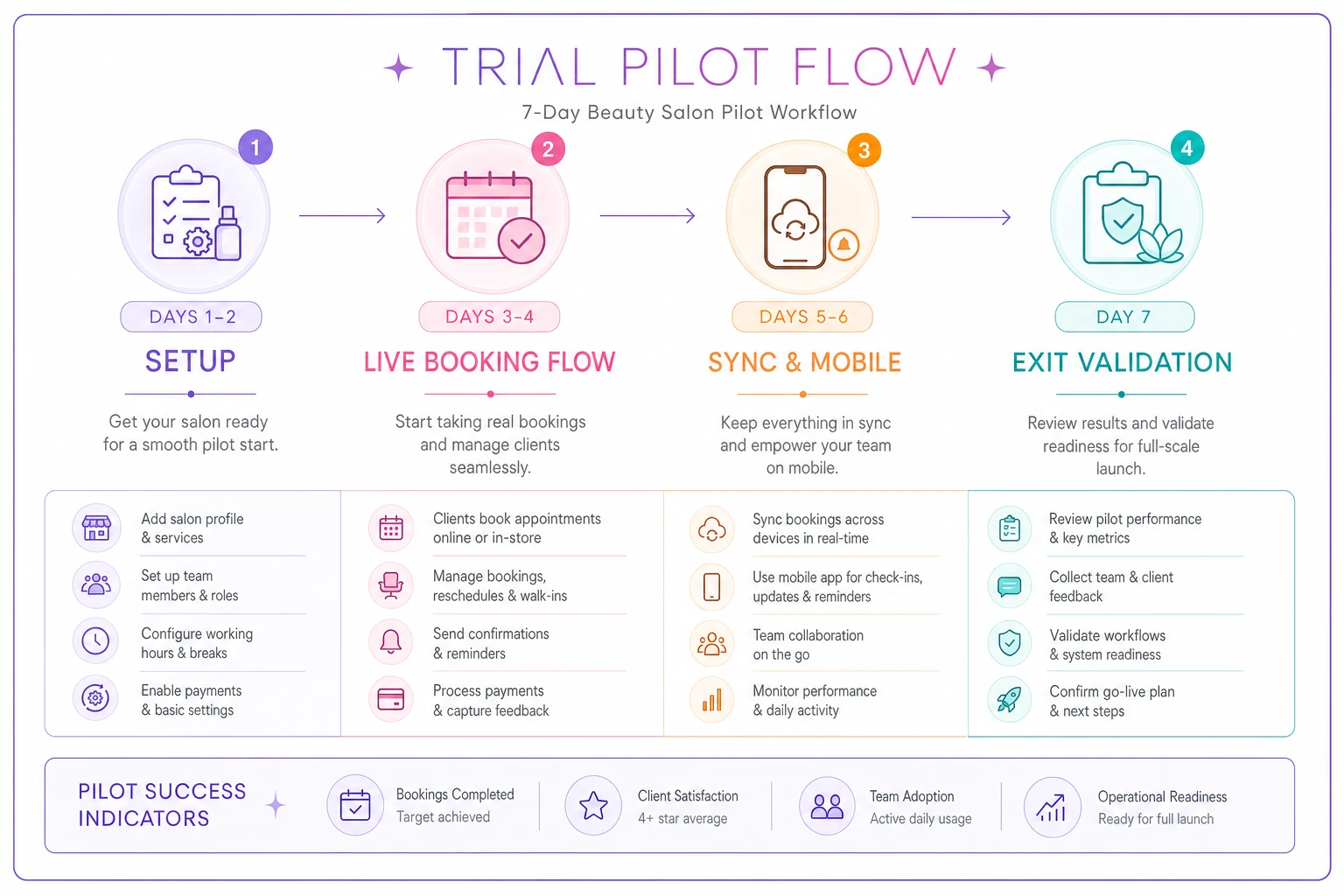
Days 1–2: Setup
-
Complete onboarding using only in-app screens (no rep help) — note where you got stuck
-
Add three real services with real durations and prices
-
Add two staff members
Days 3–4: Live flow
-
Book a real appointment to your own phone number
-
Confirm the confirmation message actually arrives (check timing)
-
Confirm the reminder fires at the configured time
-
Reply to the message and see where the reply lands
Days 5–6: Sync + mobile
-
Connect a real staff Google/Apple calendar; block time and check whether it blocks salon availability
-
Run five timed tasks on the staff mobile app
-
Test rescheduling and confirm all messages update correctly
Day 7: Exit test
-
Export your data and confirm it's usable
-
Confirm you can cancel cleanly with no surprise charge
If any confirmation or sync item fails during a controlled test, it will fail worse under real volume.
Copy-ready RFP snippet / acceptance criteria block
Paste this into your vendor RFP or contract discussion:
> Acceptance criteria — booking & communications platform > > 1. Vendor provides a minimum 7-day free trial with full feature access on the plan under evaluation, with no automatic conversion to paid without explicit written confirmation from the buyer. > 2. Self-serve, in-application onboarding is available such that a non-technical staff member can configure services, staff, and a live test booking without a scheduled call. > 3. Automated appointment confirmations and reminders are included, at no additional cost, on the evaluated plan, and are configurable within the platform. > 4. Calendar synchronization directionality (one-way/two-way) and sync latency are documented in writing. > 5. For US deployments, vendor documents 10DLC registration responsibility, fees, and timeline. For EMEA deployments, vendor confirms WhatsApp Business API support and data residency. > 6. Buyer may export all client and appointment data at any time in a standard format. > 7. All feature confirmations above are provided in writing prior to purchase.
Failure to meet criteria 1–3 disqualifies the vendor from consideration.
When this rigor is worth it — and when it's overkill
When it makes sense: You're a single location past roughly 200 monthly bookings, or any multi-location operation. At that scale, a messaging gap or a one-way sync misfire costs real money in no-shows and double-books, and switching platforms later is painful.
When it's overkill: A brand-new solo booth renter doing a handful of appointments a week. You can validate a tool in an afternoon and switch cheaply if it doesn't work out.
Who should slow down: Anyone mid-migration from another system. Verify data export first, before a shiny feature set convinces you to commit.
Real scenario
A two-location salon doing roughly 330–360 combined appointments a month shortlisted three platforms based on demos. All three claimed "automated confirmations." Under the 7-day pilot above, one required a separate SMS provider setup, one buried confirmations in a tier costing about $40 more per month than quoted, and only the third delivered an actual confirmation to a real phone on the evaluated plan.
Calendar sync exposed a bigger problem: two of the three were one-way only, which would've kept overwriting stylists' personal calendar blocks — the exact thing causing sporadic double-books on their old system. They picked the one that passed all three criteria, and the front-desk "did everyone get confirmed?" scramble mostly disappeared within the first few weeks. Nothing dramatic. Just fewer surprises.
The point
Vendor marketing is optimized to get you to sign, not to tell you what breaks in week six. The three criteria — real trial, self-serve onboarding, built-in confirmations — are easy to claim and harder to verify. Everything above is built so you don't have to take anyone's word for it: define the terms, demand written answers, run the pilot, and only mark a vendor "verified" when you've tested it yourself with a date attached.
For salon owners thinking longer-term about where operational tooling is heading, the broader shift toward automation is worth understanding — the practical playbook on the coming AI investment wave is a reasonable starting point. But for the decision in front of you right now, the checklist beats the trend. Verify, then buy.
For salon owners thinking longer-term about where operational tooling is heading, the broader shift toward automation is worth understanding — the practical playbook on the coming AI investment wave is a reasonable starting point. But for the decision in front of you right now, the checklist beats the trend. Verify, then buy.
Ready to simplify your salon operations?
Join 1,000+ salons using Salnly to save time, reduce scheduling chaos, and deliver better client experiences.