

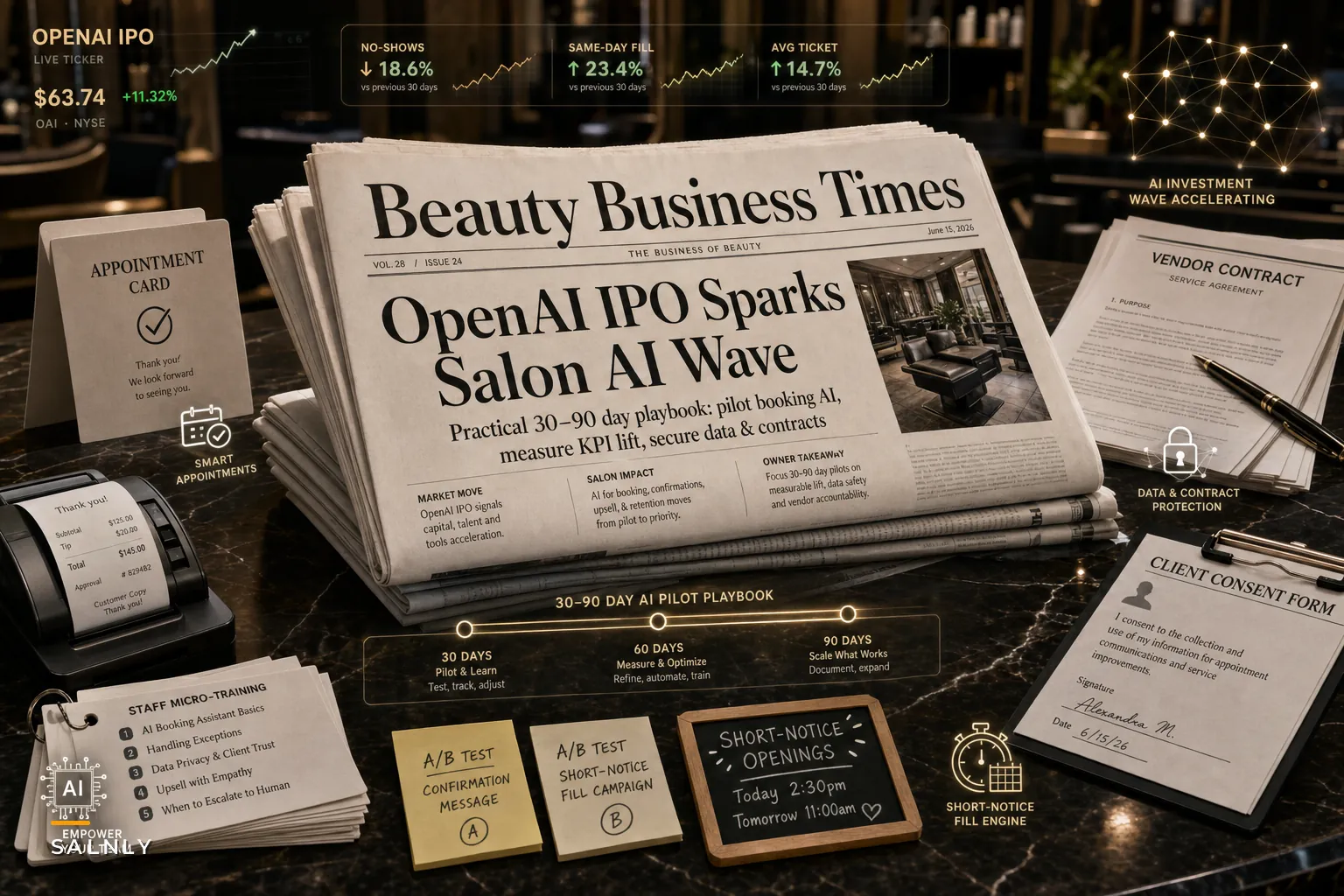

OpenAI just filed confidentially for an IPO, with Reuters reporting leadership expects to go public within the next year. This isn't just tech news—it's the starting gun for a massive wave of AI features hitting salon software over the next 12 months.
The capital flooding into AI companies means your current booking platform, POS system, and marketing tools are about to get rapid-fire updates with "AI-powered" everything. Some will genuinely transform how you operate. Most will be half-baked features that create more problems than they solve.
Watching dozens of salons struggle through the last wave of tech changes (remember when everyone rushed into online booking without thinking through double-bookings?), there's a clear pattern: the salons that test carefully and adopt selectively do well. The ones that flip every new switch immediately usually end up with angry stylists, confused clients, and operational chaos that takes months to untangle.
The features racing toward your salon right now
Smart scheduling that actually moves appointments around Not just finding open slots—these systems will actively suggest rebooking clients to optimize chair utilization. One platform I tested recently recommended moving a color client 30 minutes earlier because it predicted the previous appointment would finish faster based on that stylist's historical timing with similar services.
Conversation bots handling actual service questions Current chatbots mostly just link to booking pages. The next generation will answer "Can you do a balayage on previously highlighted hair?" or "What's the difference between your keratin treatments?" using your actual service menu and policies. The tricky part: they'll also confidently give wrong answers unless you spend serious time training them.
Automated follow-ups that adapt based on response Instead of sending the same three reminder texts to everyone, these systems track who responds, who books, who ghosts—then adjust their messaging strategy. A client who always confirms might get one text. Someone with a history of no-shows might get called directly.
Predictive inventory that orders for you The system watches your usage patterns, upcoming appointments, and seasonal trends, then suggests (or automatically places) product orders. Sounds great until it orders 50 bottles of purple shampoo because three clients booked toning appointments in one week.
Why rushing into AI adoption usually backfires
Last month, a salon owner showed me her "AI disaster folder"—screenshots of every time their new automated system went sideways. The booking AI scheduled six perms back-to-back for a stylist who hadn't done a perm in three years, because the system saw an opening and the service was technically enabled in their profile.
Stop losing appointments in the chaos.
Salnly helps you book, confirm & manage every appointment—efficiently.
- Centralized appointment management
- Client notifications
- Calendar & staff scheduling
No credit card required
The fundamental problem isn't the technology. It's that AI systems are really good at following patterns and really bad at understanding context. They don't know that scheduling highlights right after lunch on Fridays is a bad idea because that's when your colorist's afternoon caffeine crash hits. They don't understand that Mrs. Peterson only books with James, even though technically any senior stylist could do her cut.
These systems excel at repetitive tasks with clear rules. They struggle with the nuanced, relationship-driven decisions that make salons actually work. Successful adoption requires careful boundaries, not wholesale replacement of human judgment.
The salons that thrive with AI tools understand this fundamental limitation. They use automation for the tedious stuff—confirmation texts, waitlist notifications, basic inventory tracking. They keep humans in charge of relationship decisions, complex scheduling, and anything that requires reading between the lines.
An actual testing framework (not another generic checklist)
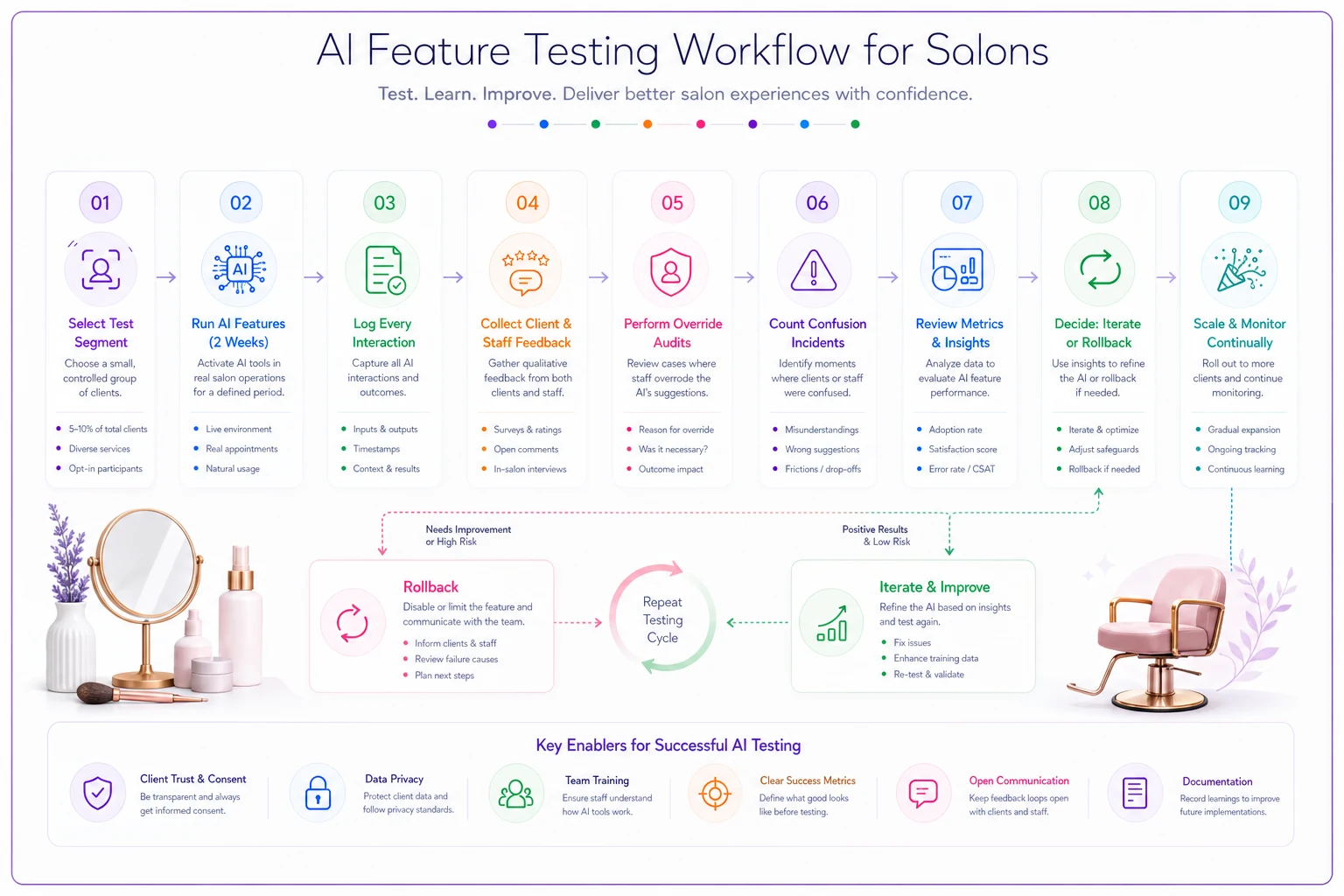
The 10-client test
Before turning on any AI feature for everyone:
-
Pick 10 clients with different booking patterns (regular, sporadic, high-maintenance, easy-going)
-
Run the AI feature for only those clients for two weeks
-
Track every interaction, good and bad
-
Ask those clients directly about their experience
-
Ask the staff members who interacted with those clients
If you can't limit the feature to specific clients, create a test segment another way—maybe just Tuesday appointments, or only for specific services. The key is controlled exposure, not throwing your entire client base into an experiment.
The override audit
For any AI system making decisions (scheduling, inventory, pricing), track for 30 days:
-
How many times staff had to override the AI
-
Why they overrode it
-
Whether the override was actually necessary
-
What pattern the AI was following that didn't work
An override rate above 20% means the system isn't ready. Either it needs better configuration or it's solving a problem you don't actually have. Some vendors will tell you that high override rates are normal during the "learning period." They're not. They indicate fundamental misalignment between what the AI thinks is important and what actually matters in your salon.
The confusion count
Document every time in the first month that:
-
A client calls confused about an automated message
-
A staff member doesn't understand what the system did
-
You have to manually fix something the AI broke
-
The AI contradicts your actual policies
More than 2-3 confusion incidents per week indicates the system is creating more friction than it's removing. Don't accept vendor excuses about "adjustment periods"—good AI tools should reduce confusion from day one.
Here's a simple testing workflow graphic.
If you can't limit the feature to specific clients, create a test segment another way—maybe just Tuesday appointments, or only for specific services. The key is controlled exposure, not throwing your entire client base into an experiment.
Where AI actually helps vs. where it hurts
Based on what's working and failing across salons right now:
| Task | AI Performance | Why | Better Alternative |
|---|---|---|---|
| Appointment reminders | Good | Clear rules, repetitive | Let AI handle fully |
| Rescheduling suggestions | Poor | Requires understanding client preferences and stylist relationships | AI suggests, human approves |
| Service recommendations | Mixed | Can analyze history but misses personal context | Use for data, not decisions |
| Inventory reordering | Good for basics | Predictable patterns for everyday products | Auto-order basics, manual for specialty |
| Pricing updates | Terrible | No understanding of client relationships or competitive dynamics | Human only |
| Review responses | Poor | Sounds generic, misses specific issues | Draft template, human personalizes |
AI thrives on repetitive tasks with consistent rules. It fails when decisions require relationship knowledge, emotional intelligence, or understanding unwritten rules. This isn't a limitation that will disappear with better technology—it's the fundamental difference between pattern recognition and human judgment.
Questions that reveal if you're ready
Who fixes it when it breaks? Not if—when. Every AI system will malfunction, give wrong information, or create unexpected problems. If your software vendor's answer is "open a support ticket," you're not ready. You need direct access to someone who can fix issues immediately during business hours.
Can you explain exactly what it's doing? "It uses AI to optimize scheduling" isn't an answer. You need to understand the actual logic: "It looks at appointment duration history for each stylist, adds 15% buffer time, and suggests openings based on typical service combinations." If you can't explain it, you can't fix it when it goes wrong.
What happens to the data? Your client information, service history, and conversation logs are being processed somewhere. Where? Who has access? What happens if you switch systems? Most salon owners discover these answers only after something goes wrong.
Can you turn it off instantly? Not "submit a request to disable"—actually turn it off yourself, immediately, without losing other functionality. If the answer is no, the vendor has too much control over your operations.
The implementation sequence that actually works
Skip the vendor's "quick start guide." Their recommendations prioritize feature adoption over operational stability. Here's the order that minimizes disruption:
Week 1-2: Confirmation messages only Start with the simplest, least risky automation. Let AI handle appointment confirmations for low-risk appointments (basic cuts, regular clients). Keep high-touch services (weddings, first-time color corrections) on manual confirmation.
Week 3-4: Waitlist notifications Add automated waitlist filling for same-day cancellations. The stakes are lower—if the AI messes up, you just have an empty chair, not an angry client.
Week 5-8: Selective rescheduling suggestions Let the AI suggest (not automatically make) rescheduling options for weather cancellations or stylist sick days. Human still approves every change.
Week 9-12: Inventory reorder suggestions AI tracks usage and suggests reorders, but doesn't place them. This gives you three months of data to verify its accuracy before trusting it with actual orders.
After 3 months: Consider conversation automation Only after the basics work smoothly, test AI handling initial service inquiries. Start with written channels (SMS, email) before voice.
Keep humans approving reschedules during early rollout so relationships stay intact.
Notice what's missing? Pricing, service recommendations, and anything touching compensation. Those require human judgment indefinitely.
Red flags that mean "run away"
Some AI features are genuinely helpful. Others are venture capital-funded disasters waiting to happen. Run away if:
The vendor promises the AI will "learn your business" but can't explain how. Learning requires feedback loops. If you can't see what it's learning or correct its mistakes, it's not learning—it's guessing.
The system wants to control your entire booking process with no manual override option. This is like giving your salon keys to someone you just met.
Pricing jumps significantly after an "introductory period." They're betting you'll be too embedded to switch when the real cost hits.
The vendor acquired the AI from another company and "integrated" it. These Frankenstein systems rarely work smoothly because the pieces weren't designed to work together.
You can't export your data in a standard format. When (not if) you need to switch systems, you'll be stuck manually recreating everything. I've seen salons lose years of client history because they trusted a vendor's promise that data would always be accessible.
What this means for your operational foundation
The salons handling AI adoption well all have one thing in common: they already track their core metrics manually. They know their real rebooking rate, average ticket, chair utilization—not because software tells them, but because they calculate it themselves.
This matters because AI amplifies whatever patterns exist in your operations. If you're already tracking no-show patterns, AI can help reduce them. If you don't even know your baseline no-show rate, AI will just automate confusion.
Before adding any AI features, make sure you're measuring the KPIs that actually matter. Not vanity metrics like "total appointments booked" but real operational drivers: service mix profitability, stylist productivity patterns, and client lifetime value trends. Having clear baseline measurements makes it obvious when AI is helping versus when it's just adding complexity.
Most AI vendors will try to convince you that their system will help you discover important metrics you're currently missing. That's backwards. You need to understand your key metrics first, then find AI tools that specifically improve those numbers.
The contract terms that matter
Data ownership: You own all client data, conversation histories, and operational patterns. The vendor has a license to use, not ownership.
Termination data export: You get all your data in a usable format within 48 hours of requesting termination. Not "up to 30 days." Not in some proprietary format. Standard CSV files you can import elsewhere.
Liability for AI errors: The vendor carries liability insurance for AI mistakes. When their bot tells a client that bleaching over box dye is fine and you end up with a correction disaster, someone needs to cover the cost.
Human escalation requirements: Clear documentation of when the system must escalate to a human and how quickly that happens.
Update notification: At least 30 days notice before any significant changes to AI behavior, with the option to maintain current version for 90 days.
Most vendors will claim these terms are "non-standard." That's because their standard terms protect them, not you. Don't budge on these points. A vendor unwilling to take responsibility for their AI's mistakes isn't ready to handle your business operations.
Building your testing checklist
Current process time: How long does this task take now? Include everything—the actual work plus fixing mistakes, handling exceptions, answering questions.
Error rate baseline: How often do mistakes happen with the current process? Be honest. That "quick" manual booking system probably has more double-bookings than you realize.
Critical failure points: What absolutely cannot go wrong? Some mistakes are annoying. Others lose clients forever.
Rollback plan: Exactly how you'll revert if the AI fails. Who does what, in what order, using which backup systems?
Success metrics: Specific numbers that indicate the AI is actually helping. Not "improved efficiency"—actual metrics like "reduced no-shows from 12% to 8%" or "cut confirmation time from 10 minutes to 2 minutes per day."
Without this checklist filled out before implementation, you're running an experiment on your entire business. The vendors won't provide this framework—they want you focused on features, not results.
The conversation your team needs to have
Before any AI implementation, gather your senior staff and ask: "What parts of our current process would break if they were automated?"
The answers will surprise you. Your receptionist knows that certain clients need extra time between booking and arrival for anxiety. Your senior colorist knows which clients will definitely change their mind about tone between booking and appointment. Your manager knows which "confirmed" appointments are still likely no-shows based on subtle pattern recognition no AI will catch.
Document these edge cases. They're not exceptions to work around—they're the core of what makes your salon work. Any AI system needs to preserve these nuances, not optimize them away.
Then ask: "What repetitive tasks make you want to scream?" These are your actual AI opportunities. The stuff everyone hates doing, has no nuance, and follows clear rules. Start there, not with the complex relationship-driven tasks that vendors claim their AI can handle.
The gap between these two lists—what needs human judgment versus what's genuinely repetitive—defines your AI adoption strategy. Everything else is vendor marketing.
A realistic 90-day adoption timeline
Days 1-30: Foundation
-
Document current processes in painful detail
-
Identify true repetitive tasks vs. those that seem repetitive but aren't
-
Set up measurement for baseline metrics
-
Research 2-3 AI options maximum
Days 31-60: Limited testing
-
Implement ONE AI feature
-
Run parallel with old system (yes, this means double work temporarily)
-
Daily check-ins with staff on what's working/breaking
-
Weekly reviews of metrics vs. baseline
Days 61-90: Controlled expansion
-
If first feature shows 20%+ improvement, expand gradually
-
If not, either reconfigure or abandon
-
Document every adjustment needed
-
Create internal training materials based on actual experience
Most salons try to compress this into two weeks. They end up spending the next six months fixing problems that could have been avoided with proper testing phases.
The vendors will push you to move faster. They'll offer "implementation bonuses" for quick adoption. Ignore them. Your timeline protects your business, not their quarterly numbers.
When AI adoption makes sense (and when to wait)
You're ready for AI features if:
-
Your current manual processes are documented and consistent
-
You have baseline metrics for what you're trying to improve
-
Your team is comfortable with your existing technology
-
You have budget for 3-6 months of potentially zero ROI while testing
You should wait if:
-
You're still figuring out basic operational processes
-
Your team struggles with current technology
-
You can't afford 10-15 hours of testing/training time over the first month
-
You're switching other major systems in the next 6 months
The biggest mistake? Salons hoping AI will fix broken processes. It won't. It will amplify whatever you're currently doing—good or bad—at digital speed.
If your appointment booking process is chaotic, AI booking will be chaotic faster. If your client communication is inconsistent, AI communication will be inconsistently automated. Fix the foundation first.
Final reality check
The AI wave hitting salon software isn't optional—your competitors will adopt these tools, your clients will expect AI-enhanced communication, and vendors will increasingly bundle AI features into their core offerings whether you want them or not.
But you do have a choice in how you respond. The salons that will thrive are the ones that treat AI adoption like they'd treat hiring a new employee: careful vetting, clear boundaries, constant monitoring, and quick correction when things goes sideways.
Start small. Test thoroughly. Keep human judgment at the center. Remember—the goal isn't to have the most AI features. It's to run a profitable salon that delights clients and supports your team. Sometimes AI helps with that. Sometimes it gets in the way.
The operational software platforms that truly understand salon workflows are building selective AI automation into specific bottlenecks while preserving the human relationships that matter. They're not trying to replace salon professionals—they're eliminating the tedious tasks that keep those professionals from doing what they do best. That's the version of AI adoption worth pursuing. Everything else is just expensive noise.
The AI wave hitting salon software isn't optional—your competitors will adopt these tools, your clients will expect AI-enhanced communication, and vendors will increasingly bundle AI features into their core offerings whether you want them or not.
Ready to simplify your salon operations?
Join 1,000+ salons using Salnly to save time, reduce scheduling chaos, and deliver better client experiences.