


Sales demos are rehearsed. The rep clicks through a perfect calendar, sends a flawless confirmation text, and shows you a mobile app that never stutters. Then you sign up, import your data, and discover the confirmation text arrives four hours late, the two-way calendar sync silently drops appointments, and the onboarding screens assume you already know where everything is.
A short trial — seven days is typical — is your one real chance to catch this before you commit your booking data and your team's daily workflow to a platform. Most owners waste it poking around randomly, then decide based on a general "feels okay" impression. That's how you end up regretting the choice in month three.
This is a testing protocol. It tells you exactly what to click, what to record, what evidence to save, and what should make you walk away. If you're still figuring out what matters to you at all, our buyer's checklist for salon & spa software pairs well with this — but this piece assumes you've narrowed it down and now need to test salon software trial claims yourself instead of taking the vendor's word for it.
Set up the trial like a real salon, not a sandbox
The biggest mistake people make in a trial is testing with clean, fake data. You create "Client A," book "Service 1" with "Staff 1," everything works, and you conclude the software is solid. Then real life — a client with two phone numbers, a stylist who works split shifts, a service that needs 15 minutes of processing time in the middle — breaks it.
Before you test anything, spend the first hour making the trial environment actually resemble your business:
-
Enter at least 3 real staff members with their actual working hours, including anyone with irregular schedules (split shifts, alternating weekends, a colorist who only comes in Thursdays).
-
Add 8–10 services with real durations, including at least one with processing/gap time (color, perms) and one back-to-back combo (cut + color).
-
Create a handful of messy client records on purpose
one with no email, one with an international phone number, one duplicate name.
-
Set your correct time zone and, if you have multiple locations, a second one in a different zone.
This takes maybe 45 minutes and it's the single highest-value thing you'll do all week. Almost every serious flaw hides in the gap between a clean demo and a real roster.
The onboarding screens: test whether a normal person can actually finish
Vendors love to say "onboarding takes minutes." What they mean is their onboarding takes minutes because they built it. The real question is whether your front-desk person — who is not technical and is busy — can get through it without calling you.
Stop losing appointments in the chaos.
Salnly helps you book, confirm & manage every appointment—efficiently.
- Centralized appointment management
- Client notifications
- Calendar & staff scheduling
No credit card required
What to actually check on the in-app setup screens:
-
First-run clarity. From a fresh login, can you tell what to do first without watching a video? Note every point where you had to guess.
-
Import behavior. Upload a small client CSV with intentionally messy data — missing fields, odd formatting. Does it tell you what failed and why, or does it silently skip rows? Silent skipping is a red flag. You'll import 2,000 clients and never know 180 didn't make it.
-
Undo and edit paths. Set up a service wrong on purpose. How hard is it to fix? Some platforms make setup easy and correction painful.
-
Progress persistence. Start setup, close the tab, come back. Did it save your progress or wipe it?
-
Mobile onboarding. Repeat the first-run experience on a phone. A lot of tools have a clean desktop setup and a broken mobile one.
A useful test: hand the trial to a staff member with zero prior context and ask them to add a new service and book a test appointment. Time it. Watch where they hesitate. If a competent adult can't book an appointment within a couple of minutes of first seeing the screen, your clients using online booking will struggle too.
Automated confirmations: the flow that quietly loses revenue when it breaks
This is where trials fail people most. Confirmation and reminder flows look fine in a demo and fall apart in edge cases. Those edge cases directly cost you no-shows.
Concrete test cases to run and record:
-
Immediate confirmation. Book an appointment. Does the confirmation arrive by SMS and email if both are configured? How long did it actually take? Time it. "Instant" is often 30 seconds; sometimes it's 20 minutes.
-
Reminder timing accuracy. Book something for tomorrow and set a 24-hour reminder. Does it fire at the right time, in the client's time zone or yours? Book across a time-zone boundary if you can — this is a classic silent failure.
-
Reschedule flow. Move the appointment. Does a new confirmation go out? Does the old reminder get cancelled, or will the client get a reminder for a time that no longer exists?
-
Cancellation flow. Cancel it. Does the client get a clean cancellation notice? Does the slot reopen immediately?
-
Reply handling. Reply "C" or "cancel" to a confirmation text if the platform claims two-way SMS. Does it actually process the reply, or does it vanish into a number nobody monitors?
-
Opt-out compliance. Reply STOP. Verify the client is marked opted-out and won't be messaged again. This is a legal issue, not just a nicety.
Save the actual messages. Screenshot the SMS with the timestamp visible. Forward the confirmation email to yourself. If the vendor claims customizable templates, edit one and confirm your edit shows up in the real message — sometimes the editor works but the change never reaches the sent version.
Worth knowing: the difference between a reliable confirmation system and a shaky one rarely shows in the happy path. It shows in reschedules and cancellations, because that's where two things have to stay in sync — the calendar state and the message queue. If you only test "book and receive," you're testing the 20% that always works.
Calendar sync: the feature most likely to be over-promised
"Two-way calendar sync" is on every feature list. Actual, reliable, bidirectional sync that respects staff calendars and time zones is much rarer. This deserves a disproportionate chunk of your trial time because a broken sync causes double-bookings, and double-bookings are the fastest way to make a client furious.
What "working" sync actually means
| Sync claim | What to test | What failure looks like |
|---|---|---|
| Two-way sync | Create an event in Google/Outlook, see if it blocks the slot in the salon app; then book in the app and check it appears in the external calendar | One direction works, the other lags or never syncs |
| Time-zone handling | Book across a DST change or a different location's zone | Appointment shows at the wrong hour on one side |
| Per-staff calendars | Connect two different staff members' external calendars | Everyone's events pile into one calendar, or the wrong staff gets blocked |
| Sync speed | Time how long an external event takes to block the salon slot | Minutes-to-hours delay leaves a window for double-booking |
| Deletion sync | Delete an event externally | The salon slot stays blocked forever, or vice versa |
The stress test below is the specific sequence that catches both directions of failure cleanly.
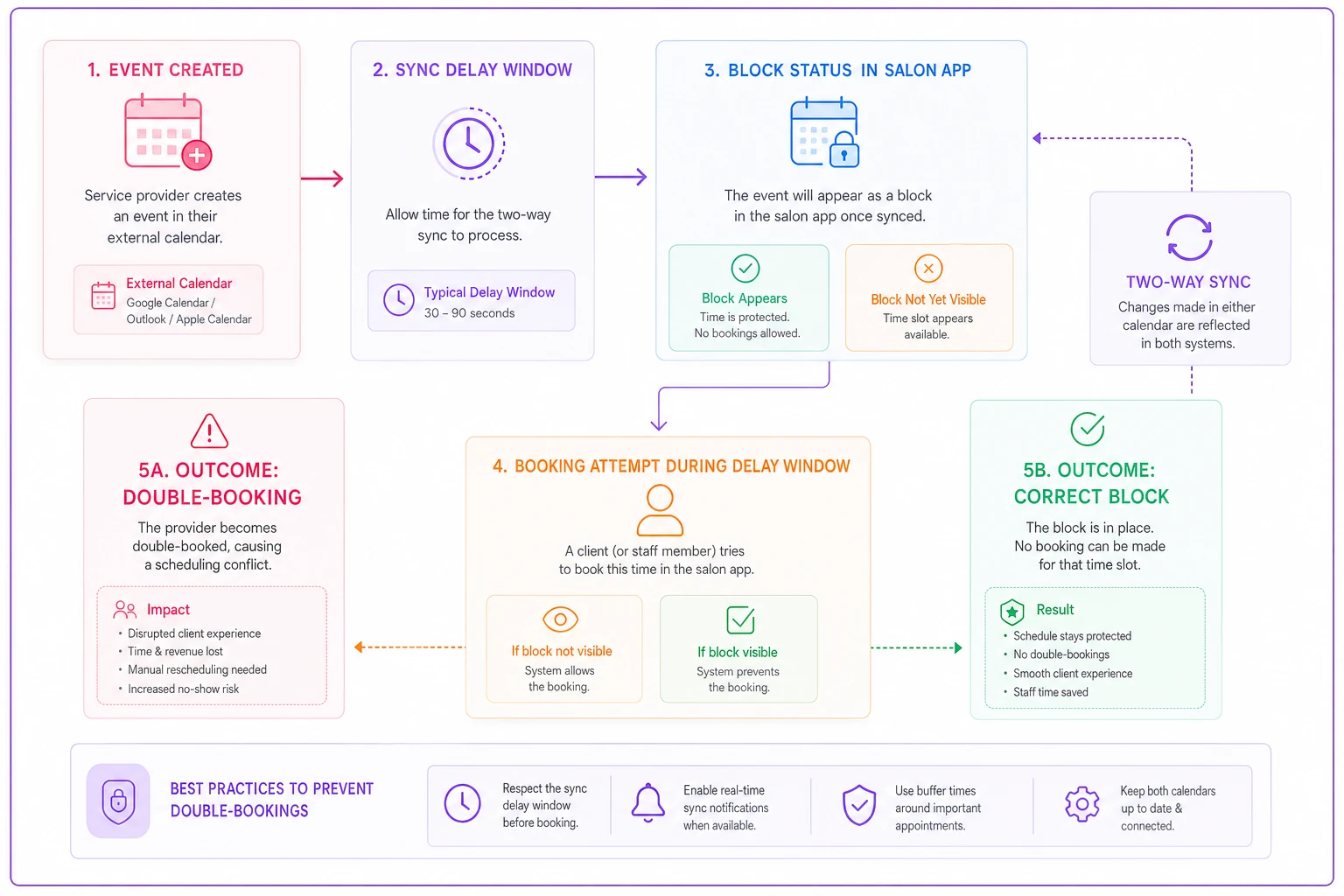
Diagram of the two-way calendar sync flow.
The double-booking stress test
-
Have a stylist's personal Google Calendar connected as "busy."
-
Add a personal event on that calendar for tomorrow at 2pm — something like "dentist."
-
Wait a few minutes, then try to book a client with that stylist at 2pm inside the salon app.
-
If the app lets you book over the dentist appointment, the "sync" is decorative. Reject it or flag it hard.
Then reverse it: book a client in the salon app and confirm the block appears on the stylist's external calendar within a reasonable window. A sync that's one-directional in practice will let external commitments collide with salon bookings, and your stylist finds out when two people show up at the same time.
The stress test above maps the most common failure path for calendar sync. Run it in this order so you can catch both directions cleanly.
Mobile app quality: a checklist and the metrics that matter
Owners often judge the mobile app by whether it looks nice. That's not the metric. The metric is whether your team can run a real day on it — and whether it fails gracefully when the salon Wi-Fi drops, which it will.
Mobile app assessment checklist:
-
App launches to a usable screen in under roughly 3 seconds on a mid-range phone, not just the newest iPhone.
-
You can view the day's schedule, book, reschedule, and check out a client entirely from the phone.
-
Offline or weak-signal behavior
turn on airplane mode mid-task. Does it queue the action and sync later, or lose your work and crash?
-
Push notifications for new bookings actually arrive, and arrive promptly.
-
The staff view respects permissions — a stylist shouldn't see the full business's financials.
-
Checkout/payment on mobile completes without kicking you to a browser or freezing.
-
Rotate the phone, resize text, check nothing breaks.
Things worth recording: cold-start time, any crash (screen-record it), and how many taps it takes to do the three most common daily actions. If booking a walk-in takes 11 taps across three screens, your front desk will hate it during a rush. "Hate it during a rush" is how software gets abandoned.
Check the app store reviews too, but focus on recent one- and two-star reviews. Filter for words like "sync," "crash," "reminder," and "update." Vendors can't scrub those, and they often describe exactly the failures you're trying to catch in your trial.
Evidence to collect so your decision isn't based on vibes
By day five you'll have a fuzzy impression. Impressions are unreliable and impossible to compare across two platforms. Collect hard evidence as you go.
-
Screenshots of every confirmation, reminder, and cancellation message with visible timestamps.
-
Screen recordings of the double-booking stress test and any crash or glitch.
-
A simple log — a spreadsheet is fine — noting
test performed, expected result, actual result, time taken, pass/fail.
-
The failed-import report, if any rows dropped.
-
Copies of actual emails/SMS forwarded to yourself.
This log does double duty: it's your decision record, and it's your ammunition when you follow up with the vendor. "Your two-way sync took 22 minutes to block a slot and let me double-book at 2pm — here's the recording" gets a very different response than "sync seems slow."
Red flags that justify walking away
Some findings aren't minor bugs to raise with support. They're reasons to reject the platform outright, especially since a trial shows the software at its most polished. If it's shaky now, it won't be better after you've committed.
-
Confirmations or reminders that arrive late, inconsistently, or not at all.
-
Two-way sync that only works one direction, or lets you double-book over an external "busy" event.
-
Silent data-import failures with no error report.
-
No STOP/opt-out handling for text messages.
-
Reminders that keep firing for cancelled or rescheduled appointments.
-
A mobile app that crashes or loses in-progress work when signal drops.
-
Support that can't answer a specific technical question during the trial — this is when they're trying hardest to keep you.
-
Setup progress that doesn't save, or edits that can't be undone.
One useful rule: if a core claim from the sales demo fails a straightforward test, treat every other claim as unverified until you've confirmed it yourself. A vendor comfortable overstating one feature has usually overstated others.
A realistic scenario
A two-location salon running roughly 330–360 appointments a month across both sites ran a 7-day trial on a platform whose demo looked flawless. During setup they connected each stylist's personal Google Calendar and ran the double-booking stress test above.
The result: external "busy" events took 15–20 minutes to block the salon slot, and in that window the app let them book a client over a stylist's blocked time. They also found that reschedules didn't cancel the original reminder — a test client got a reminder for an appointment that had already been moved. Both issues were captured on screen recordings.
They sent the recordings to the vendor. The response — that sync delays were "expected behavior" — was the actual decision-maker. Two locations sharing stylists meant that lag would produce real double-bookings on a regular basis. They passed, kept looking, and later estimated the sync issue alone would have caused several ruined appointments a month, plus the goodwill hit of clients arriving to a double-booked chair. The trial cost them a week; missing that catch would have cost them for a year.
Questions to send the vendor after testing
Don't ask these before you test — ask after, so you can check the answers against what you actually observed:
-
What's the guaranteed delivery window for confirmations and reminders, and what happens if the SMS provider fails?
-
Is calendar sync truly bidirectional, and what's the typical sync latency? (Compare the answer to your measured number.)
-
How are STOP/opt-outs and reminder cancellations handled on reschedule?
-
What happens to my data if I cancel — can I export everything, and in what format?
-
What did the failed import rows fail on, and how do I fix them in bulk?
Don't ask these before you test — ask after, so you can check the answers against what you actually observed:
Next steps
Run the full protocol on your top choice first. If it clears the confirmation, sync, mobile, and onboarding tests with evidence to back it up, you're in good shape. If it fails a core test, run the same protocol on your backup rather than talking yourself into the flaws — trials are the best-case version of the software, and best-case shouldn't be double-booking your chairs.
The whole point of a short trial is to convert a polished sales pitch into things you've personally verified. Test with messy, real data. Push the edge cases — reschedules, cancellations, time zones, weak signal. Save the receipts. Then decide from what you saw, not from what you were shown.
Run the full protocol on your top choice first. If it clears the confirmation, sync, mobile, and onboarding tests with evidence to back it up, you're in good shape. If it fails a core test, run the same protocol on your backup rather than talking yourself into the flaws — trials are the best-case version of the software, and best-case shouldn't be double-booking your chairs.
The whole point of a short trial is to convert a polished sales pitch into things you've personally verified. Test with messy, real data. Push the edge cases — reschedules, cancellations, time zones, weak signal. Save the receipts. Then decide from what you saw, not from what you were shown.
Ready to simplify your salon operations?
Join 1,000+ salons using Salnly to save time, reduce scheduling chaos, and deliver better client experiences.