

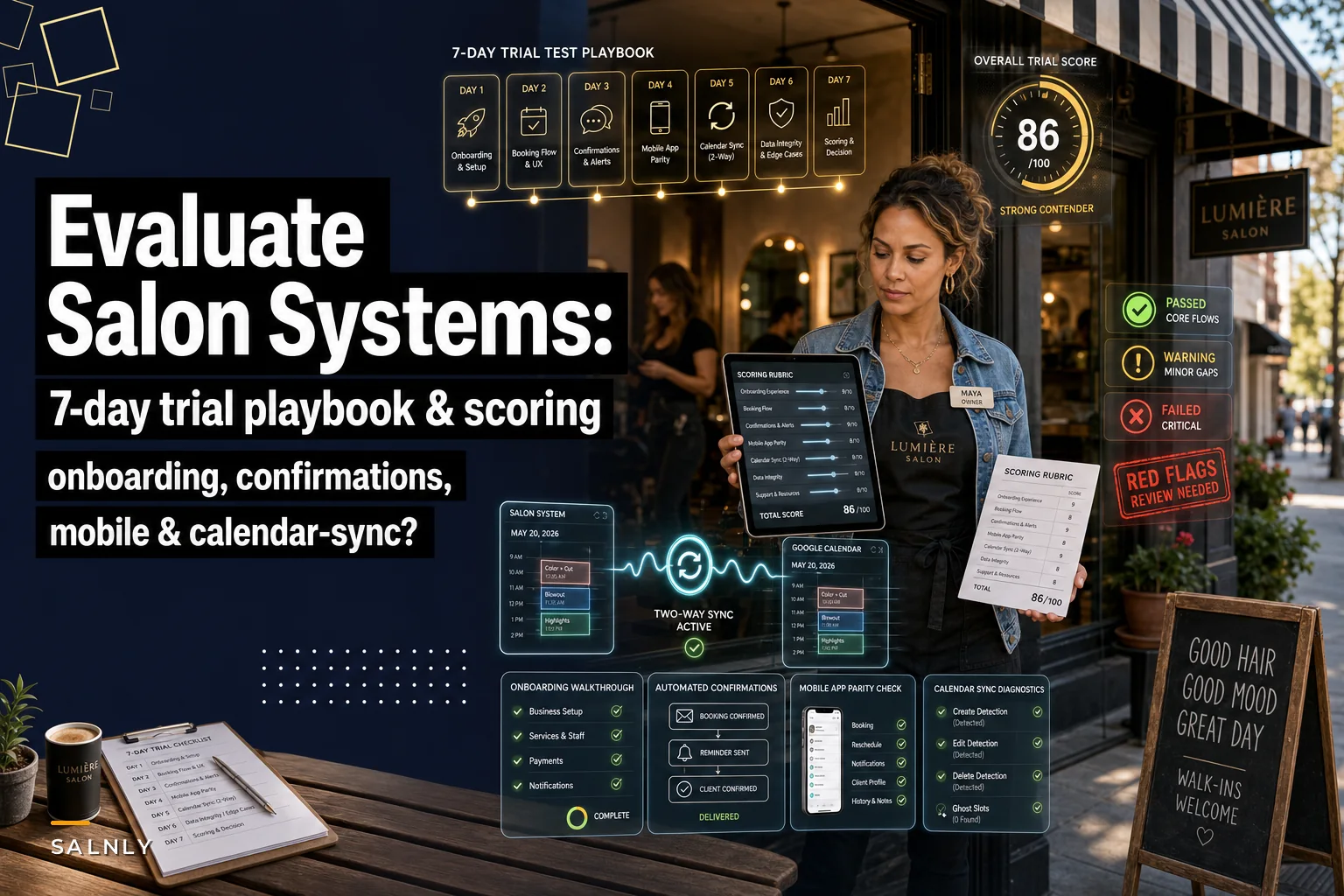

Most salon owners sign up for a free trial, poke around the dashboard for twenty minutes, decide it "feels nice," and then discover three weeks after migrating that the calendar sync drops double-booked slots or the confirmation texts go out at 2 a.m. The trial was never the problem. The method was. You evaluated vibes instead of running the thing like a client would.
Seven days is plenty of time to catch almost every deal-breaker—but only if you treat it like a structured test, not a tour. Below is a scoring rubric and a day-by-day plan you can apply to any vendor, whether you're looking at the big names or a scrappy newcomer. No brand comparisons. Just a repeatable way to grade what's in front of you.
The scoring rubric (print this before you start)
Score each category from 0 to 5. Anything that lands below a 3 in onboarding, confirmations, mobile, or calendar sync should make you nervous. A total under 15 out of 20 usually means you'll be fighting the software instead of using it.
| Category | What a 5 looks like | What a 1–2 looks like | Weight |
|---|---|---|---|
| In-app onboarding | Guides you to a live, bookable service in under 15 min without support tickets | You need a sales rep call just to add one service | ×1 |
| Automated confirmations | Fires reliably, correct timing, editable copy, logs delivery status | "Sent" but no proof, wrong timezone, no reminder cadence | ×2 |
| Mobile app quality | Staff can run a full day from a phone, offline-tolerant, no crashes | Web page in a wrapper, logs you out, no notifications | ×1 |
| Calendar sync | Two-way, fast, handles edits/cancels without ghost slots | One-way, delayed, creates duplicates or orphaned events | ×2 |
Confirmations and sync carry double weight for a reason. Those two are where real money leaks—no-shows and double-bookings are the expensive failures, and they're also the hardest to spot in a polished demo.
Day 1 — Onboarding: can *you* get to a real booking alone?
The most useful trial signal is whether you can create a working, client-facing booking without talking to anyone. Vendors love to "walk you through setup" on a call because the call hides friction. Refuse that help on day one. You want to feel the raw experience your future manager will feel.
Stop losing appointments in the chaos.
Salnly helps you book, confirm & manage every appointment—efficiently.
- Centralized appointment management
- Client notifications
- Calendar & staff scheduling
No credit card required
Exact steps:
-
Sign up with a fresh email, don't connect anything yet.
-
Add one real service from your menu—say, a balayage at 2.5 hours, $180.
-
Add one staff member with a limited availability window (Tue/Thu only).
-
Open the public booking link in an incognito window and try to book that service yourself.
-
Time the whole thing from signup to "appointment confirmed."
What to watch for: Did the onboarding screens actually guide you, or did they dump you into an empty dashboard? Could you set a buffer after the service? Did the 2.5-hour duration block the right amount of time, or did it let someone book an overlapping slot?
Software that demos beautifully often has onboarding screens that were built almost as an afterthought. You can feel it—the setup wizard asks for things in a weird order, or it quietly skips the one step you actually needed, like assigning the service to the staff member you just created. If you hit a dead end that forces a support ticket on your first service, score it a 2 and move on.
Days 2–3 — Confirmation flows: test the failure cases, not the happy path
Any system can send a confirmation when everything goes right. The trial is for finding out what happens when things go wrong, because that's what actually happens in a salon—clients reschedule, cancel at the worst time, book for the wrong stylist, or enter a landline instead of a mobile.
Run these scenarios with a couple of throwaway phone numbers and email addresses:
-
Book an appointment and confirm the immediate confirmation lands. Check the exact timestamp and timezone.
-
Reschedule it. Does a new confirmation go out, and does the old reminder get cancelled? A lot of systems will still send a reminder for the original time after a reschedule.
-
Cancel it. Does the client get a cancellation notice, or just silence?
-
Book for tomorrow and verify the reminder fires at the time the vendor claims—then actually wait for it. Don't trust the settings screen; trust the received message.
-
Enter a bad phone number on purpose. Does the system flag the failed delivery, or does it mark it "sent" and move on?
That last one matters more than people realize. The difference between a confirmation system that claims delivery and one that verifies it is the difference between knowing your no-show risk and guessing. If the system can't show you a delivery status log, you're flying blind on the exact thing you bought it for.
Also open the message copy editor. Can you change wording, add your cancellation policy, include a deposit link? Rigid, uneditable templates are a quiet long-term cost—you'll end up sending messages that don't sound like your salon, and clients notice.
Day 4 — Mobile app: run a fake day from a phone
Your front desk and stylists will live in this app more than the web dashboard. So stop testing from your laptop. Grab a phone, install the app, and try to run an entire morning without touching a computer.
The mobile stress test:
-
Check in a client from the phone.
-
Add a product to the sale and take a payment (or test payment, if available).
-
Rebook that client for six weeks out, right there in the app.
-
Put the phone in airplane mode for 30 seconds, then back on. Does the app recover, or does it log you out and lose what you were doing?
-
Trigger a booking from another device and see if the staff member gets a push notification in a reasonable time.
Two red flags come up constantly here. First, apps that are just the website wrapped in a shell—you'll know because they're slow, the buttons are tiny, and nothing works offline. Second, missing or delayed push notifications. If a stylist doesn't get pinged when a client books or cancels, they'll default to ignoring the app entirely.
Score it a 5 only if a non-technical staff member could run a day on it without asking you questions. That's the real bar.
Days 5–6 — Calendar sync: the ghost-slot hunt
This is where most trials quietly fail and most owners never find out until after migration. Calendar sync problems don't show up in a 20-minute demo because demos don't make edits. They just show you a pretty week view.
Connect the software's calendar to whatever your team actually uses—Google Calendar, Apple, Outlook, test the one your staff lives in. Then run this sequence and watch both calendars at once:
-
Create an appointment in the salon software. Confirm it appears in Google/Apple within a minute or two.
-
Edit the time in the external calendar. Does it push back to the salon software, or only sync one direction?
-
Delete the event in the external calendar. Does the salon software show a free slot now, or does it still think that time is booked?
-
Create a personal "blocked" event in the external calendar during business hours. Does the booking link correctly refuse to book over it?
-
Create two bookings back-to-back, then cancel the first. Does the second one stay correctly placed?
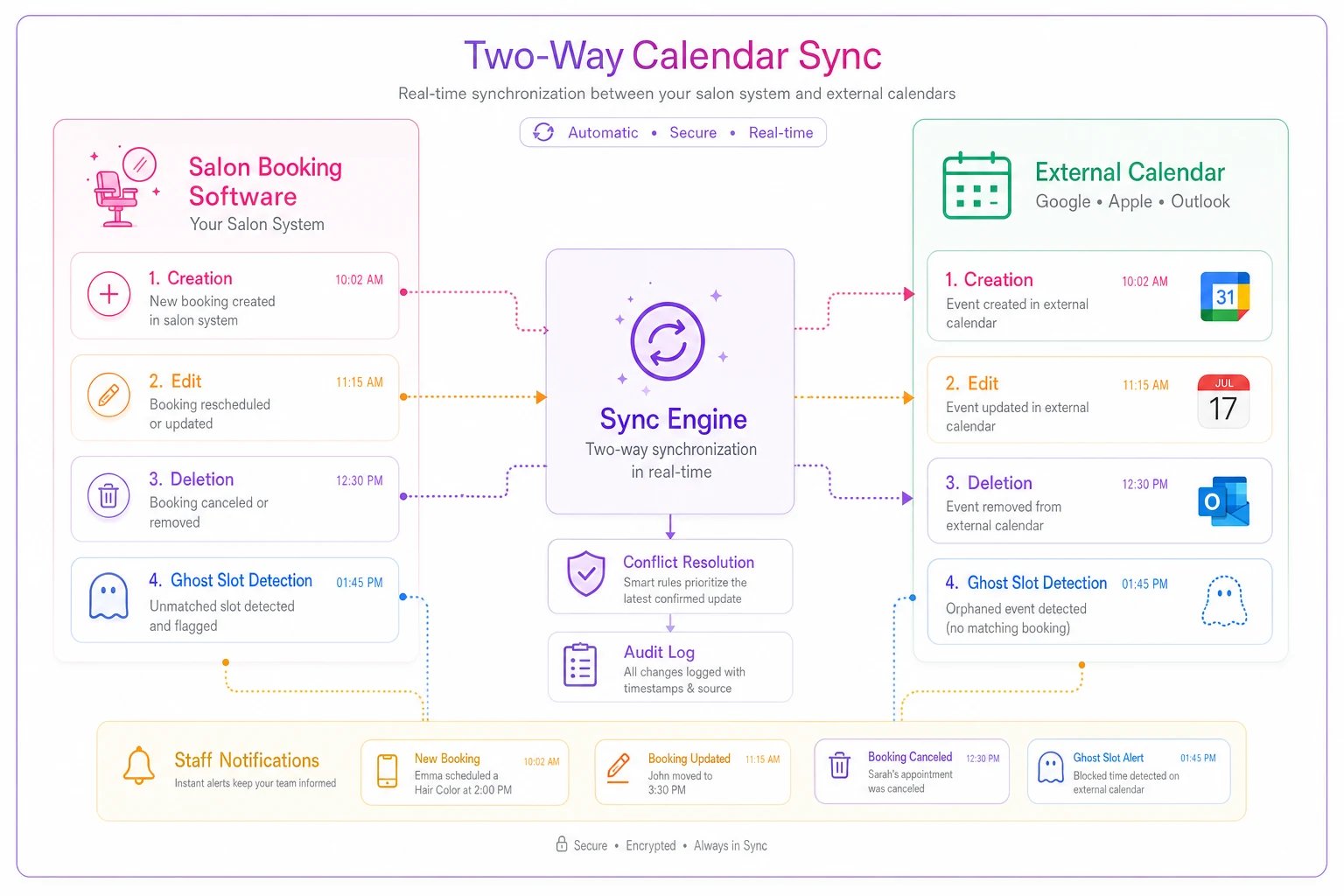
The nightmare outcome is the ghost slot—an appointment that was cancelled or moved but still shows as booked somewhere. In a busy salon this translates directly to empty chairs you think are full, or double-bookings you don't see coming until someone's standing at the front desk.
Rerun the edit/delete sequence during a busy hour to increase the chance of catching timing-related ghost slots.
If sync is one-directional, know that going in. It's not automatically disqualifying—plenty of salons live with it fine—but you need to decide consciously, not discover it after your stylists have been editing their personal calendars for a week assuming changes flowed back.
Here's a simple workflow to visualize the create/edit/delete cycle across both calendars.
The nightmare outcome is the ghost slot—an appointment that was cancelled or moved but still shows as booked somewhere. In a busy salon this translates directly to empty chairs you think are full, or double-bookings you don't see coming until someone's standing at the front desk.
A real scenario: the three-chair salon that almost picked the wrong tool
A small color-focused salon with three stylists, doing somewhere around 300–340 appointments a month, ran a trial the lazy way the first time: clicked around, liked the interface, signed up. Within the first month they noticed reminders going out at odd hours to some clients and not at all to others. Turns out the system marked failed texts as "delivered," so their actual no-show rate—sitting around 9–11%—was invisible in the reporting. They were budgeting against numbers that weren't real.
On their second attempt with a different vendor, they ran the failure-case confirmation tests above over two days. They caught that the new system logged delivery status, flagged bad numbers, and let them edit the reminder copy to include their 24-hour cancellation policy. Nothing dramatic happened overnight, but no-shows drifted down into the 6–7% range over the next couple of months simply because they could finally see and fix the broken reminders. The difference wasn't a better salon. It was a better test.
Questions to ask the vendor (and the answers that should worry you)
Ask these directly during your trial. The way they answer tells you as much as the answer itself.
-
"Can I see a delivery status log for every confirmation and reminder?" — If they redirect toward "we send them reliably," that's a soft no.
-
"Is calendar sync two-way, and how fast does a cancellation propagate?" — Vague answers here usually mean one-way or slow.
-
"What happens to a scheduled reminder when a client reschedules?" — You want to hear "the old one is cancelled automatically."
-
"Is the mobile app native or a web wrapper, and does it work offline?" — A straight answer means they're not hiding anything.
-
"Can I edit confirmation copy and timing per service?" — "It's on the roadmap" means no, today.
-
"If I need to leave, can I export all my client and appointment data?" — Hesitation here is a lock-in warning.
Vendors confident in their core plumbing answer these fast and specifically. Vendors who redirect every question back to features, integrations, or AI capabilities are usually compensating for shaky fundamentals. There's a lot of noise right now about automation layered into booking tools, and it's worth keeping perspective on what actually matters—we covered the broader hype cycle in the practical playbook on the coming AI investment wave. Fancy automation built on top of unreliable sync or fake delivery logs is just a faster way to make mistakes.
When this full test is overkill
If you're a solo stylist with one chair and 40 clients, you don't need to stress-test two-way calendar sync across six stations. The onboarding and confirmation tests still matter—no-shows hurt a solo booker proportionally more—but you can skip the heavy mobile multi-user scenarios. Match the depth of the test to the complexity of your operation.
If you're running multiple locations or a team that edits calendars constantly, the sync and mobile sections are the most important parts and deserve extra time. A half-day of ghost-slot hunting is cheap insurance against months of scheduling chaos.
Your 7-day checklist at a glance
Before you score anything, make sure you've actually done the work across all seven days—a half-completed test gives you false confidence, which is worse than no test at all.
-
- [ ] Day 1 Create a live, bookable service alone—no sales call. Time it.
-
- [ ] Days 2–3 Test confirmation failure cases: reschedule, cancel, bad number, wrong timezone, delivery logs.
-
- [ ] Day 4 Run a fake morning entirely from the mobile app, including airplane-mode recovery.
-
- [ ] Days 5–6 Hunt ghost slots—edit, delete, and block across both calendars and watch for mismatches.
-
- [ ] Day 7 Ask the vendor questions, score every category, and total your rubric.
The point of all this isn't to find perfect software—it doesn't exist. The point is to find the specific weaknesses before you commit, so you go in knowing exactly what you're working with. A trial where you discover nothing isn't a passed test. It's a test you didn't actually run.
The point of all this isn't to find perfect software—it doesn't exist. The point is to find the specific weaknesses before you commit, so you go in knowing exactly what you're working with. A trial where you discover nothing isn't a passed test. It's a test you didn't actually run.
Ready to simplify your salon operations?
Join 1,000+ salons using Salnly to save time, reduce scheduling chaos, and deliver better client experiences.